


Six invoicing tools for designers, ranked on the thing other roundups skip: whether they actually handle your tax. Two do. Four don’t. Here’s the honest split.

You invoiced a client in Berlin for €2,400 in March — the number on that invoice traces straight back to the rate you set. The money landed in April, converted at some rate you didn’t pick, and now you have no clue what that line turns into on your Schedule C, or how much of it you should have parked for tax. You’re a designer. You signed up to design.
The invoicing part has tools. The tax part has tools. They’re almost never the same tool. That gap is what this guide is about.
Most “best invoicing software for designers” articles rank tools on templates, payment speed, and how pretty the dashboard looks. Fine as far as it goes, but it leaves you running two systems: one that gets you paid, one that works out what you owe. This guide ranks six tools on both, with a hard focus on the tax side everyone else skips: quarterly estimated tax, deductible expense categorization, 1099 tracking, and how cleanly the data drops into a Schedule C. International clients get their own section, because designers take overseas work more than most freelancers do.
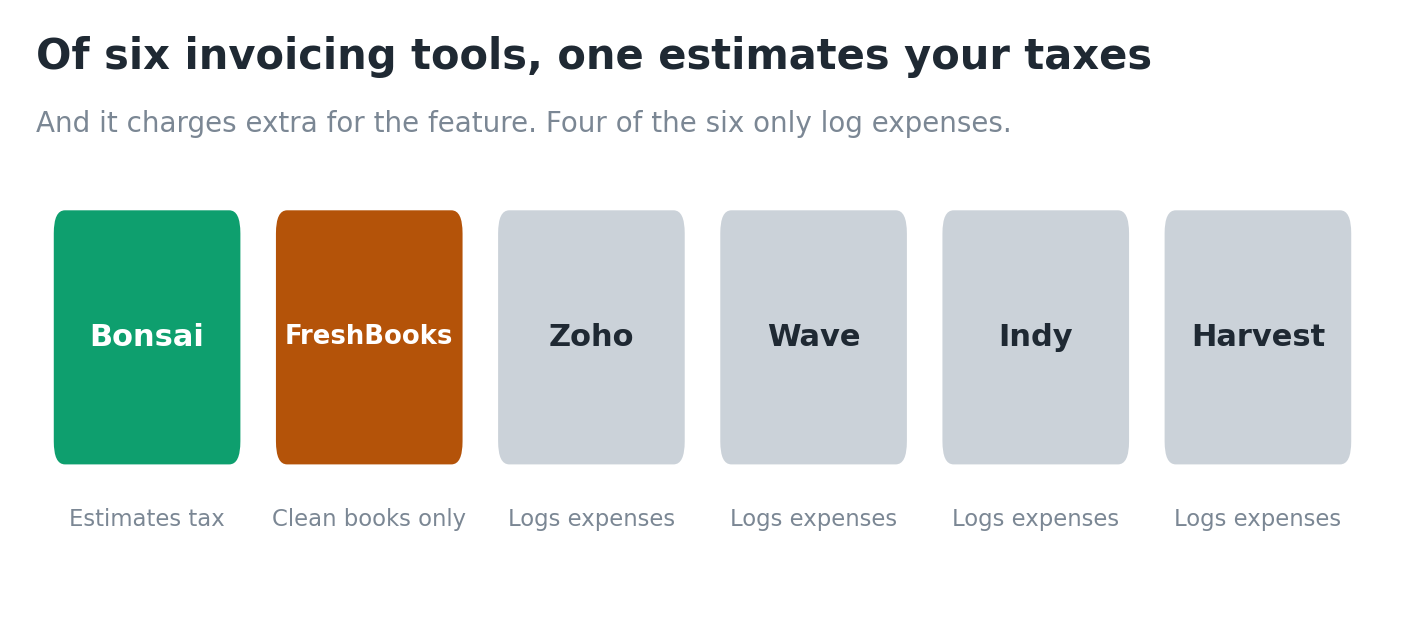
One thing before we start, because it changes how you read the whole list. Of these six tools, exactly one does real tax estimation out of the box, and it charges you extra for it. Two of them barely touch tax. If a roundup tells you all six are great “invoicing and tax” tools, that roundup didn’t test the tax features. [source: vendor pricing and feature pages, May 2026]
The ranking, if you want it in ten seconds
- Bonsai if you want one tool that invoices and estimates your tax, you’re US-based, and you’ll pay for the add-on.
- FreshBooks if you want the best invoicing and books clean enough that tax season isn’t a rebuild, and you’ll calculate quarterly tax separately.
- Zoho Invoice if free and international invoicing matter most, tax handled elsewhere.
- Wave if free and mostly domestic, with the payout caveat below.
- Indy if you want proposals, contracts, and invoices in one place and will bolt on tax separately.
- Harvest if you bill by time and want one-click time-to-invoice. It’s a time tracker first, not a tax tool.
Only the top two do anything real on tax, and the number one charges extra for it. The rest are invoicing tools that log expenses. The detail below explains why, and how each one handles international clients.
Why “invoicing plus tax” is a real category and not marketing
Here’s the chain that breaks for designers. You send an invoice. The client pays. That payment is income. That income carries self-employment tax at 15.3% on top of your income tax, and nobody withheld a cent of it. [source: irs.gov self-employment tax] When your invoicing tool and your tax tracking live in two different places, you spend four nights a year hand-copying numbers between them, usually at 11pm the day before a deadline.
A tool that does both means the income you invoice flows straight into a running tax estimate. In March you can see you owe roughly $1,900 for Q1. You don’t find out in April when it’s a nasty surprise. The deductible software subscriptions, the new monitor, the Adobe plan: you tag them as you go instead of rebuilding them from a shoebox in January.
The trouble is that “handles tax” means six different things across these six tools. So before the rankings, here’s the test each one had to pass.
The four tax features I checked in each tool
- Estimated quarterly tax calculation. Does it tell you, in dollars, what to pay the IRS on January 15, April 15, June 15, and September 15, based on what you actually earned and spent?
- Deductible expense categorization. Can you tag expenses to categories that map to Schedule C lines, ideally with bank import so it happens on its own?
- 1099 awareness. Does it help you track income against the 1099-NEC and 1099-K thresholds, or at least hand you clean income totals to check against the forms clients send?
- Schedule C export. Can you pull a report that lines up with the Schedule C, or hand a clean file to a CPA, without rebuilding it by hand?
Read the line-by-line Schedule C walkthrough if you want to see exactly which lines those categories feed. It matters for the export point below.
The six tools, scored on tax handling at a glance
This is the table the generic designer-invoicing roundups don’t have. It scores each tool only on the tax side, since the invoicing side is covered to death everywhere else. Pricing moves constantly, so check current numbers on each vendor’s page before you buy. [source: vendor pricing pages, verify weekly]
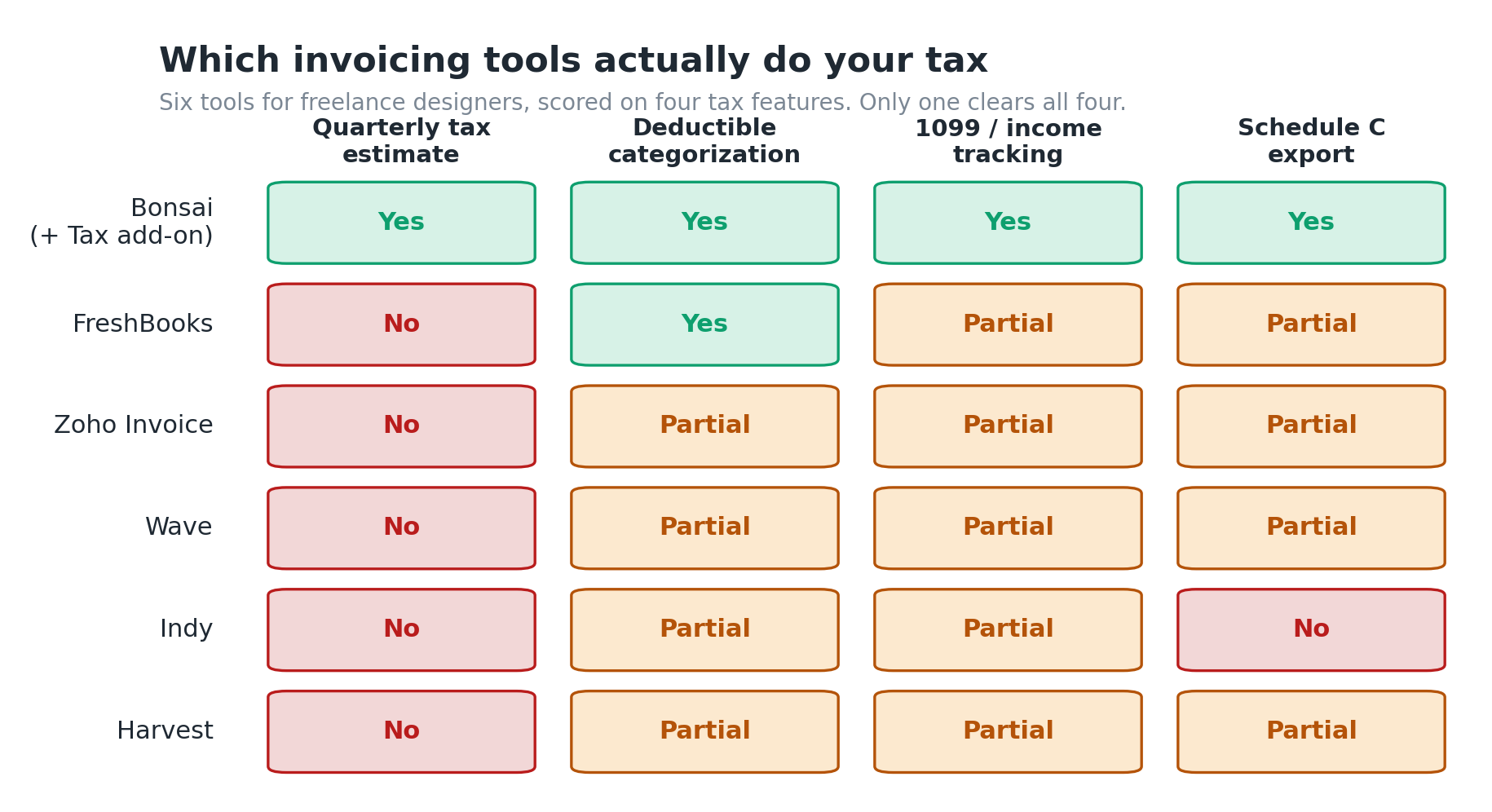
| Tool | Quarterly tax estimate | Deductible expense categorization | 1099 / income tracking | Schedule C export | Tax built in or add-on |
|---|---|---|---|---|---|
| FreshBooks | No native estimator | Yes, expense categories | Income reports, no 1099 tool | Profit & loss report a CPA can use | Built in (no estimator) |
| Bonsai | Yes, via Bonsai Tax | Yes, auto via bank import | Income tracked, deduction finder | Year-end tax reports | Paid add-on (~$100/yr), US/UK/CA/AU only |
| Wave | No | Yes, basic | Income reports | Accounting reports, export to CSV | Limited, no tax estimation |
| Zoho Invoice | No | Basic expense logging, no estimation | Income reports | CSV export, deeper accounting in Zoho Books | Effectively none in Invoice alone |
| Indy | No | Basic expense logging | Income tracking | Reports, no Schedule C mapping | None for tax estimation |
| Harvest | No | Expense tracking only | Income via invoices | Export to accounting tools | None, it is a time tracker first |
Four of these six don’t meaningfully do tax. That’s the honest split, and it’s the whole reason this article exists.
The pattern is blunt. If you genuinely want one tool for invoicing and tax, Bonsai is the only one that pulls it off, and you pay extra and have to live in one of four countries. FreshBooks is the best of the rest, because its expense and reporting layer is clean enough that tax season isn’t a rebuild, even though it won’t work out your quarterly payment for you. The other four are invoicing tools that happen to log expenses.
Now the detail, tool by tool, designer-first.
FreshBooks: best for designers who want clean books a CPA can use
FreshBooks is the invoicing tool most designers try first, and for good reason. The invoices look professional with no effort, recurring invoices and automated late-payment reminders come built in on the paid plans, and the client-side experience is clean. [source: freshbooks.com features page]
On tax, here’s the honest split. FreshBooks tracks expenses, lets you categorize them, and spits out a profit and loss report your accountant can work from directly. What it won’t do is calculate your quarterly payment. There’s no “you owe $1,900 on June 15” number anywhere in it. You still need a separate calculation for that, which our tax set-aside guide and quarterly filing walkthrough both cover. [source: freshbooks.com, verify no estimator on current plans]
So why does it still rank near the top of a tax-focused list? Because clean books are 80% of the tax problem. A freelance UX designer making $84k with thirty-odd invoices and a hundred-plus expenses a year doesn’t struggle at tax time because the math is hard. They struggle because the data is a mess. FreshBooks keeps the data clean, so the actual filing, whether you do it or a CPA does, is fast.
Pricing runs on tiered plans (Lite, Plus, Premium), and there’s a billable-client cap that bites: the entry plan caps you at five billable clients, which trips up designers with a long tail of small accounts. Sources quote the entry plan anywhere from $19 to $23 a month depending on promos, so check the live price. [source: freshbooks.com pricing, conflicting third-party numbers, verify directly]
- Best for: designers who want strong invoicing and books tidy enough that tax season is data entry, not archaeology.
- Weak spot: no quarterly estimate, and the five-client cap on the cheapest plan.
For the fuller invoicing-side breakdown, see the FreshBooks vs QuickBooks comparison and the FreshBooks vs Xero comparison.
Bonsai: the only tool here that genuinely estimates your taxes

Bonsai is the one tool on this list built around the whole problem at once. Its invoicing talks to its tax tools, so income from paid invoices feeds a running quarterly estimate, and connecting your bank auto-imports and sorts your deductible expenses. [source: hellobonsai.com/taxes] One freelancer who ran it for three months said the estimate landed within $200 of their CPA’s number. [source: solofinancehub.com Bonsai review, Feb 2026, third-party usage]
Pair your invoicing tool with a dedicated business bank account; our Mercury Bank review for freelancers covers a popular option.
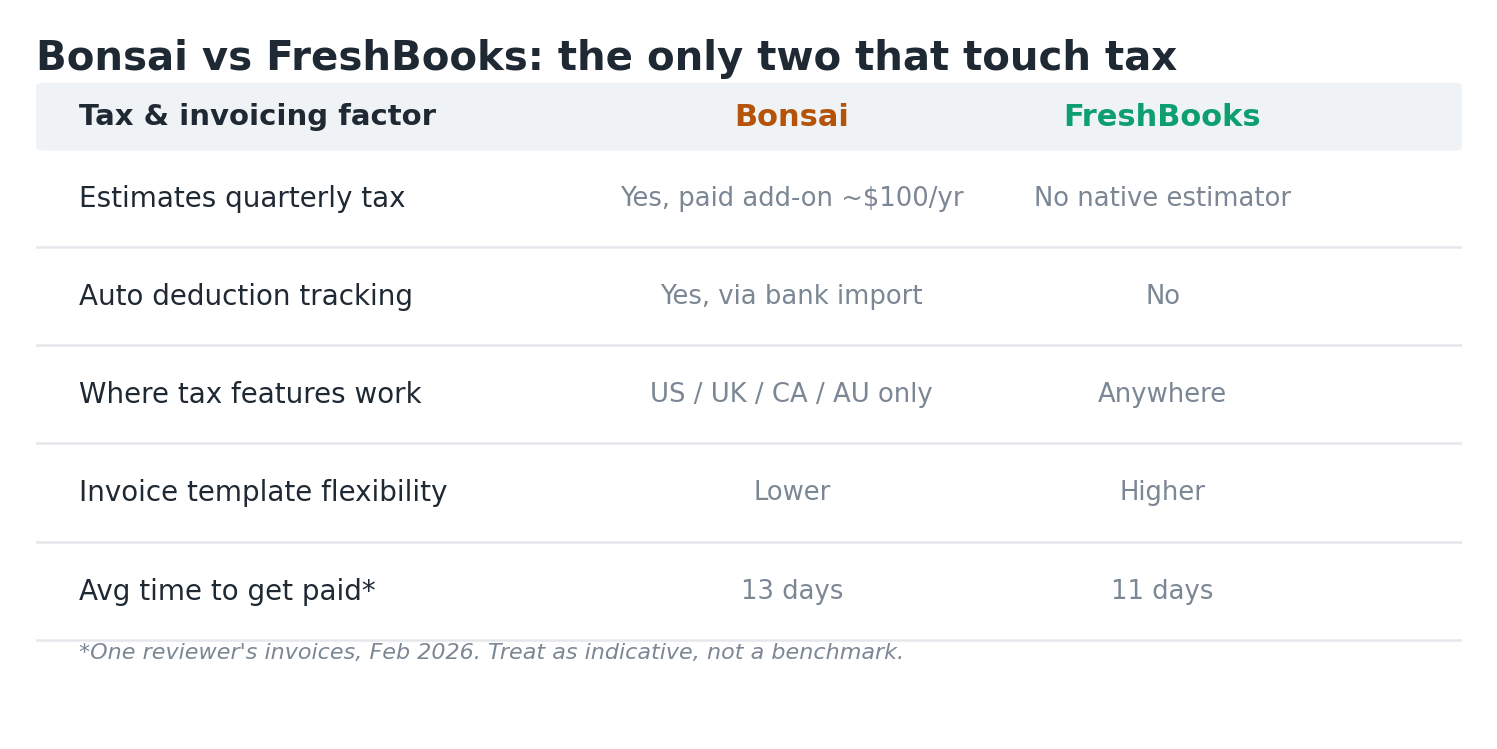
Two catches, and they’re real. First, the tax engine is a paid add-on called Bonsai Tax, roughly $100 a year on top of your subscription, not included in the base plan. [source: hellobonsai.com help center and softwareadvice.com, confirmed May 2026] Second, the automatic deduction and tax tracking only works if you’re a freelancer in the US, UK, Canada, or Australia. [source: websiteplanet.com Bonsai review] US-based is fine, but know going in that the tax features are gated by both price and geography.
On invoicing alone, Bonsai is good, not best. The templates give you fewer customization options than FreshBooks, which stings if you care how a billing document looks, and you’re a designer, so you do. One reviewer clocked average payment time at 13 days on Bonsai against 11 on FreshBooks across their invoices. [source: solofinancehub.com, Feb 2026] Small gap. It adds up across a year.
- Best for: US-based designers who want one login for invoices, contracts, and an actual quarterly tax number, and will pay for the Tax add-on.
- Weak spot: tax is a paid add-on, US/UK/CA/AU only, and invoice templates are less flexible than FreshBooks.
Wave: free invoicing, but do not expect tax help

Wave’s pull is obvious. The core invoicing and accounting is free, and you only pay on payment processing. For a designer just past the hobby stage, billing a handful of clients, that’s genuinely useful. It tracks income and expenses and exports accounting reports to CSV.
On the tax features this article is actually about, Wave is thin. No quarterly estimator. Expense categorization is basic. No Schedule C mapping, no 1099 tracking layer. You get tidy-ish records to hand a CPA or feed into separate tax software, and that’s the ceiling. [source: waveapps.com features, verify]
One thing worth flagging. Several roundups in early 2026 pointed to reports of Wave freezing payment-processing funds for some users, traced back to a February 2026 social thread. I haven’t been able to confirm it against a primary source, so treat it as a “search recent reviews before you rely on Wave for payouts” note, not settled fact. [source: secondary roundups citing a Feb 2026 Twitter/X thread, unverified, confirm independently]
- Best for: early-stage designers who want free invoicing and will handle tax separately.
- Weak spot: no tax estimation, basic categorization, and payout-reliability questions worth checking.
If free is the priority, the Wave vs Zoho Invoice comparison puts the two free options head to head.
Zoho Invoice: excellent free invoicing, tax lives in a different product

Zoho Invoice is one of the strongest free invoicing tools out there, full stop. It’s completely free, lets you send up to 500 invoices a year, supports quotes and multi-currency, and the templates are solid. [source: zoho.com/us/invoice/pricing, confirmed May 2026: 500 invoices/year, 2 users, 3 projects] If you bill international clients, the multi-currency support alone earns it a look.
The tax story is where it drops out of this article’s core promise. Zoho Invoice does record and categorize expenses on the free plan, so it is not bare. What it does not do is estimate your quarterly tax or map anything to a Schedule C. There’s no “you owe $1,900 on June 15” number, and the deeper accounting and reporting sit in Zoho Books, a separate paid product. So “Zoho handles your tax” really means “log expenses here, then do the actual tax work elsewhere.” [source: zoho.com/us/invoice and zoho.com/us/books, confirmed May 2026]
- Best for: designers who want free, professional, multi-currency invoicing and will handle tax elsewhere.
- Weak spot: no tax estimation inside Invoice; you need Zoho Books or a separate tax tool.
Indy: nice all-in-one workflow, weak on the tax side
Indy packs proposals, contracts, invoices, and time tracking into one freelancer-focused workspace, and reviewers rate it highly on ease of use and support. [source: capterra.com Indy reviews] If you want the whole client workflow in one place, it’s a pleasant tool to live in.
On tax, Indy is light. It logs income and basic expenses, but there’s no quarterly estimator and no Schedule C mapping. It’s a workflow tool, not a tax tool. [source: weusethis.io/indy and vendor features, verify] Pick Indy and you’ll want to pair it with a dedicated tax approach.
- Best for: designers who want proposals, contracts, and invoices in one tidy workflow.
- Weak spot: no real tax estimation or Schedule C export.
Harvest: a time tracker with invoicing, not a tax tool
Harvest’s strength is time tracking that turns into invoices in one click, which suits designers billing hourly or on retainer. It tracks expenses and produces profitability reports, and the invoicing is kept deliberately simple. [source: getharvest.com features]
For what this article cares about, Harvest is the clearest case of wrong category. No quarterly estimate, no Schedule C mapping, and even its invoicing skips the advanced tax calculation and multi-currency that FreshBooks and Zoho handle. [source: vecosys.com invoicing roundup, May 2026] It exports to accounting tools, which tells you the plan: do your tax somewhere else.
- Best for: designers who bill by time and want one-click time-to-invoice.
- Weak spot: effectively no tax features; it is a time tracker first.
What about international clients? The part most roundups skip
Designers work with overseas clients more than most freelancer types, so your invoicing tool has to handle currency, and your tax handling has to handle foreign income. Two separate problems, and the tools solve them unevenly.
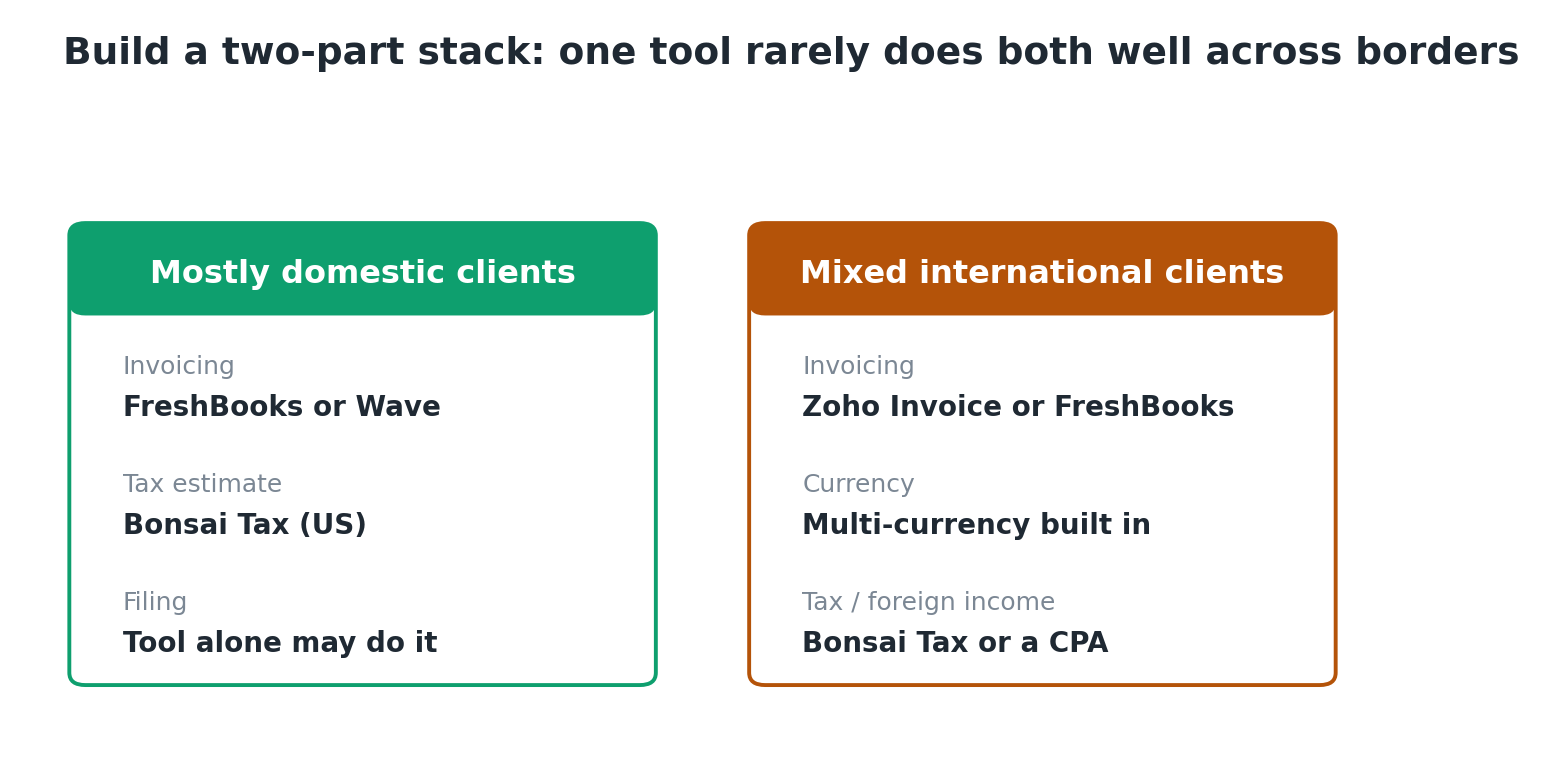
On the invoicing side, multi-currency matters. Zoho Invoice and FreshBooks both let you invoice clients in their currency. Harvest’s invoicing is deliberately basic and weaker on multi-currency. [source: vecosys.com, May 2026] If half your work is for clients in the EU or UK, that’s a real filter.
On the tax side, here’s what none of these tools fully solve. Income from a foreign client is still US taxable income if you’re a US person, and it still lands on your Schedule C. [source: irs.gov, verify foreign income guidance] That €2,400 invoice paid in April converts to dollars at the rate when you got it, and that dollar figure is what you report. The tools track the number once it hits your account, but none of them give you state-specific or treaty-specific advice. For that, see the state-by-state freelance tax guide, and once international income gets material, a CPA earns their fee.
The realistic setup for a designer with mixed international work: Zoho Invoice or FreshBooks for the multi-currency invoicing, and a deliberate tax tracking layer (Bonsai Tax if you’re US-based, or a CPA at tax time) for the income side. One tool rarely does both well across borders.
The mistake designers make: assuming “tracks expenses” means “does taxes”
This is the misread that runs through the forum threads. A designer picks Wave or Zoho because it logs expenses, figures that means tax is handled, then hits April with no estimate ever calculated and a pile of uncategorized transactions. Logging an expense is not the same as knowing your quarterly payment or mapping that expense to a Schedule C line.
The distinction that matters: does the tool produce a dollar figure you can actually pay the IRS, and does it sort your spending the way the tax form expects? On that test, only Bonsai (with the Tax add-on) clears both. FreshBooks clears the categorization half. The rest clear neither.
If you want the standalone tax tools that do estimation properly without the invoicing, the Keeper Tax review and FlyFin review cover those, and the FlyFin vs Keeper Tax head-to-head compares them directly.
A 5-minute decision: which of these six fits you
Run these in order. Stop at the first yes.
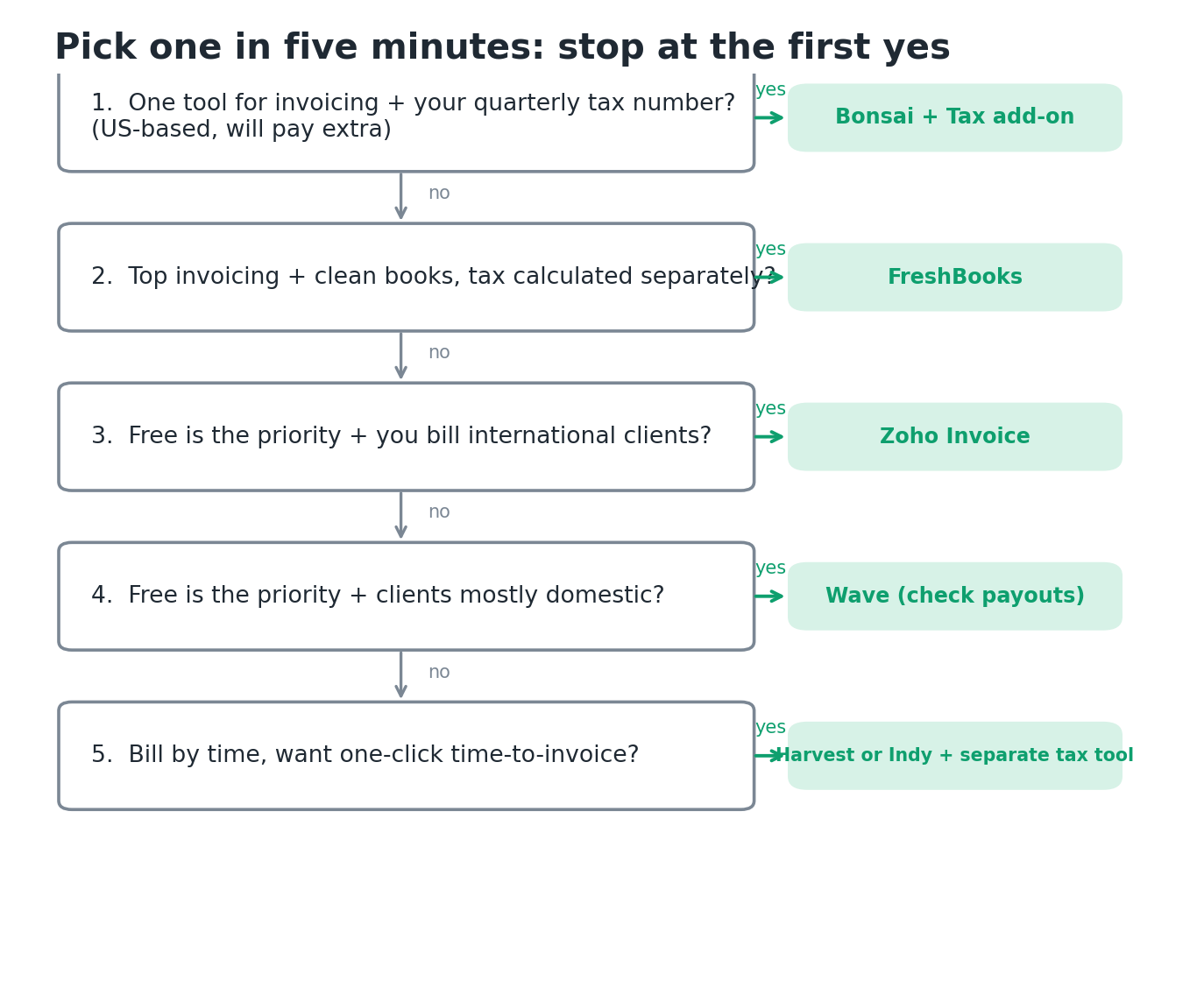
- Do you want one tool to invoice and tell you your quarterly tax number, and are you US-based and willing to pay extra? Bonsai with the Tax add-on. It’s the only one that does this.
- Do you want top-tier invoicing and clean books for your CPA, and you’ll calculate quarterly tax separately? FreshBooks. Best invoicing, tidy data, no estimator.
- Is free the priority and you bill international clients? Zoho Invoice for multi-currency, tax handled elsewhere.
- Is free the priority and your clients are mostly domestic? Wave, with the payout-reliability caveat noted above.
- Do you bill by time and want one-click time-to-invoice? Harvest or Indy, paired with a separate tax tool.
Notice none of these answers is “one tool solves everything.” For most US designers the real-world stack is FreshBooks or Bonsai for invoicing plus a clear tax method. The accounting software guide for designers and the general invoicing roundup go wider if invoicing features are your main concern. You’ll find the rest of our finance tool write-ups in our full library of freelance finance tool reviews. Every rating here follows our methodology.
Free: the designer’s invoicing-plus-tax comparison sheet

Grab the one-page sheet that scores all six tools on the four tax features (quarterly estimate, deductible categorization, 1099 tracking, Schedule C export), plus a quick multi-currency column for international work. Print it, pick one, stop running two systems. Drop your email and it lands in your inbox.
Frequently Asked Questions
What is the best invoicing software for designers that also handles taxes?
For a single tool that both invoices and estimates your taxes, Bonsai is the only one of these six that does it, through its paid Bonsai Tax add-on, and only for freelancers in the US, UK, Canada, or Australia. If you want the best invoicing with clean records for tax season but are fine calculating quarterly payments separately, FreshBooks is the stronger pick. Most designers end up with one good invoicing tool plus a deliberate tax method, rather than one tool that does both perfectly.
Does FreshBooks calculate my quarterly estimated taxes?
No. FreshBooks tracks income and expenses and produces a profit and loss report your accountant can use, but it won’t generate a quarterly estimated tax figure telling you what to pay on each deadline. You’ll need a separate calculation. Our set-aside guide and quarterly filing walkthrough both cover how to work that number out. Check current FreshBooks features on their site, since plans change.
Is Wave or Zoho Invoice good enough for taxes if they are free?
For invoicing, both are genuinely good and free. For taxes, neither estimates your quarterly payment, and the expense categorization is basic. They give you reasonably tidy records to hand a CPA or feed into tax software, which is the ceiling. If you want actual tax estimation, you’ll need a separate tool like Keeper Tax or FlyFin, or Bonsai with its Tax add-on.
How do these tools handle invoices to international clients?
Zoho Invoice and FreshBooks both support multi-currency invoicing, so you can bill an EU or UK client in their currency. Harvest’s invoicing is more basic here. On the tax side, none of these tools give treaty or foreign-income advice. As a US person, foreign client income is still US taxable and still goes on your Schedule C, converted to dollars at the rate when you received payment. When international income is a big share of your earnings, a CPA is worth it.
Do any of these tools track 1099 income for me?
Not in a dedicated way. These are tools for the income you invoice, not for reconciling the 1099-NEC and 1099-K forms clients and platforms send you. They give you clean income totals you can check those forms against, which is genuinely useful at tax time. For how the 1099-K and 1099-NEC thresholds work in 2026 and what to do when the numbers don’t match, see our 1099 threshold guide.
Should I pay for Bonsai Tax or just hire a CPA?
They solve different problems. Bonsai Tax, at roughly $100 a year, gives you running quarterly estimates and automatic deduction tracking through the year, so April doesn’t blindside you. A CPA, often $800 to $2,000 a return, handles the actual filing and gives advice a tool can’t. Plenty of designers use both: the tool for in-year visibility, the CPA at filing. If your situation is simple and domestic, the tool alone may be enough. This is informational, not tax advice.
Start Your Free Trial with FreshBooks
This article is informational and not tax or legal advice. Tax laws and software pricing change frequently. The One Big Beautiful Bill Act was signed July 4, 2025, and rules continue to shift, so verify current thresholds and deadlines at IRS.gov and confirm tool pricing on each vendor’s site before deciding. For your specific situation, consult a qualified CPA.

About the author
Gareth is the founder of Freelancer Profit, a Dubai-based entrepreneur with a business consulting and leadership coaching background. He built the site to give freelancers honest, affiliate-free reviews of finance and tax tools, every one researched from official documentation, current pricing, and hundreds of real user reviews across Trustpilot, the BBB, and the app stores. It’s independent research, not professional tax advice, so check your own situation with a CPA.