

Freelancer Profit rating: 4.2/5. A strong no-fee operating account for freelancers. Just don’t park idle savings here.

Mercury gives freelancers free business banking with no monthly fee and free USD wires. It also shuts the door on anyone without a registered LLC or corporation. Here is who actually wins, and who should pick something else.

You formed a single-member LLC in March, pulled your EIN from the IRS, and started reading Mercury reviews. Every one of them is written for a startup with a seed round and a five-person finance team. None of them tells you what changes when you’re the entire company.
This Mercury bank review for freelancers is written for the solo operator: the freelance designer, writer, developer, or consultant trying to work out whether Mercury fits a one-person business. Almost every other review buries the one fact that decides it, so that’s where we start.
Can a freelancer even open a Mercury account?
Only if you’ve registered a business entity. Mercury wants an IRS-issued EIN and formation documents, such as your Articles of Organization for an LLC or Articles of Incorporation for a corporation, per its own eligibility requirements. A freelancer working as a bare sole proprietor, with no registered entity, generally can’t open an account at all.
This is the part that catches solo freelancers off guard. A freelance copywriter earning $61,000 who files a Schedule C under their own name, with no LLC, hits a wall partway through the application. The fix is to register an LLC first. That runs a state filing fee, commonly $50 to $300 and higher in a few states, plus the time it takes to get your EIN. If you’re weighing that step anyway, read our guide on sole proprietor vs LLC vs S-corp for freelancers and our breakdown of the best LLC formation services before you pay anyone.
Mercury takes companies registered in the United States and a short list of other places, including the British Virgin Islands, the Cayman Islands, Singapore, and the UAE outside free zones. International founders can qualify if they own a US-registered entity. It won’t open accounts for trusts, and it stays out of money services, adult entertainment, cannabis, and internet gambling.
One more thing to know before you trust your money to it. Mercury is a financial technology company, not a chartered bank. Your deposits are FDIC-insured through partner banks, currently Choice Financial Group and Column N.A. Mercury applied for its own national bank charter in December 2025, and that application is still pending as of mid-2026.
What does Mercury cost a solo freelancer?
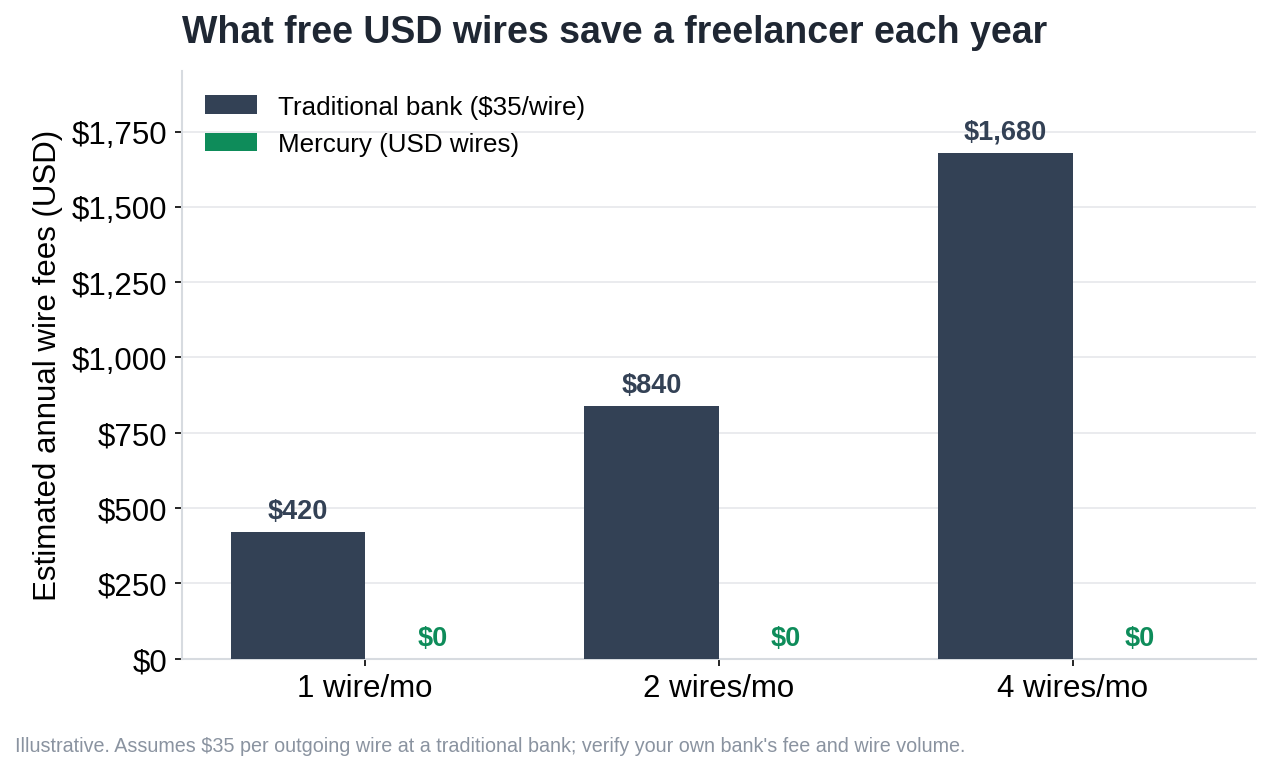
The core account is free. No monthly maintenance fee, no minimum balance, no overdraft fee, no per-transaction fee. Domestic ACH and USD wires are free, and international wires sent in USD are free too, which is rare. Non-USD transfers carry a 1% currency conversion fee.
For some freelancers that free wire policy matters more than anything else. A developer billing two clients in Berlin and moving several international USD wires a month saves real money against a traditional bank that charges $25 to $45 per wire. Do the math on your own volume before you assume the savings apply to you.
Two free features earn their place for a solo operator. Mercury includes basic invoicing, so you can send an invoice and take card, Apple Pay, or Google Pay without bolting on a separate tool. You can also spin up to 50 virtual cards to wall off subscriptions like Adobe or your hosting, which makes categorizing expenses at tax time less painful.
Here’s the part marketing copy blurs. Mercury’s standard checking and savings pay little to no interest on their own. The meaningful yield comes from Mercury Treasury, a separate investment product covered below that most solo freelancers won’t qualify for. Treat Mercury as a no-fee operating account, not a place your idle cash grows. If smoothing out feast-and-famine months is your real problem, our guide to managing freelance cash flow tackles that directly.
There’s a paid plan starting at $35 a month. It adds advanced invoicing, enriched NetSuite automations, reimbursements for more than five active users, and Treasury account management. For a one-person business, almost none of that earns its keep. The free tier covers what a solo freelancer actually needs.
The downsides most Mercury reviews bury
Here’s the honest list, the part vendor-friendly reviews skip or soften.
- No cash deposits. Mercury is online only. If a client ever pays you in cash, you can’t walk it into Mercury. You can pull cash out at Allpoint ATMs, but you can’t deposit physical cash at all.
- No physical branches. Support runs through messaging and email during business hours. Freelancers on Reddit’s small business community tend to like the interface and gripe that support slows down as Mercury grows.
- You must register an entity. The EIN and formation document requirement rules out bare sole proprietors, as covered above. It’s the most common reason a freelancer gets rejected.
- No joint business accounts. The business account is single-owner in practice. Mercury Personal, its consumer account, does offer joint accounts for up to four people, but that’s a separate product, not your business checking.
- A partner bank under scrutiny. Choice Financial Group, one of Mercury’s partner banks, is currently under a federal consent order. Your deposits stay FDIC-insured, but it’s the kind of detail you want before reading marketing copy that calls everything safe.
None of these are dealbreakers for everyone. The cash issue means nothing to a UX designer paid by Stripe and wire. It’s a hard stop for a photographer who still takes cash bookings at local events. Match the downside to how you actually get paid.
Does Mercury work with QuickBooks, FreshBooks, and Stripe?
| Accounting tool | Syncs directly with Mercury? | What you actually get |
|---|---|---|
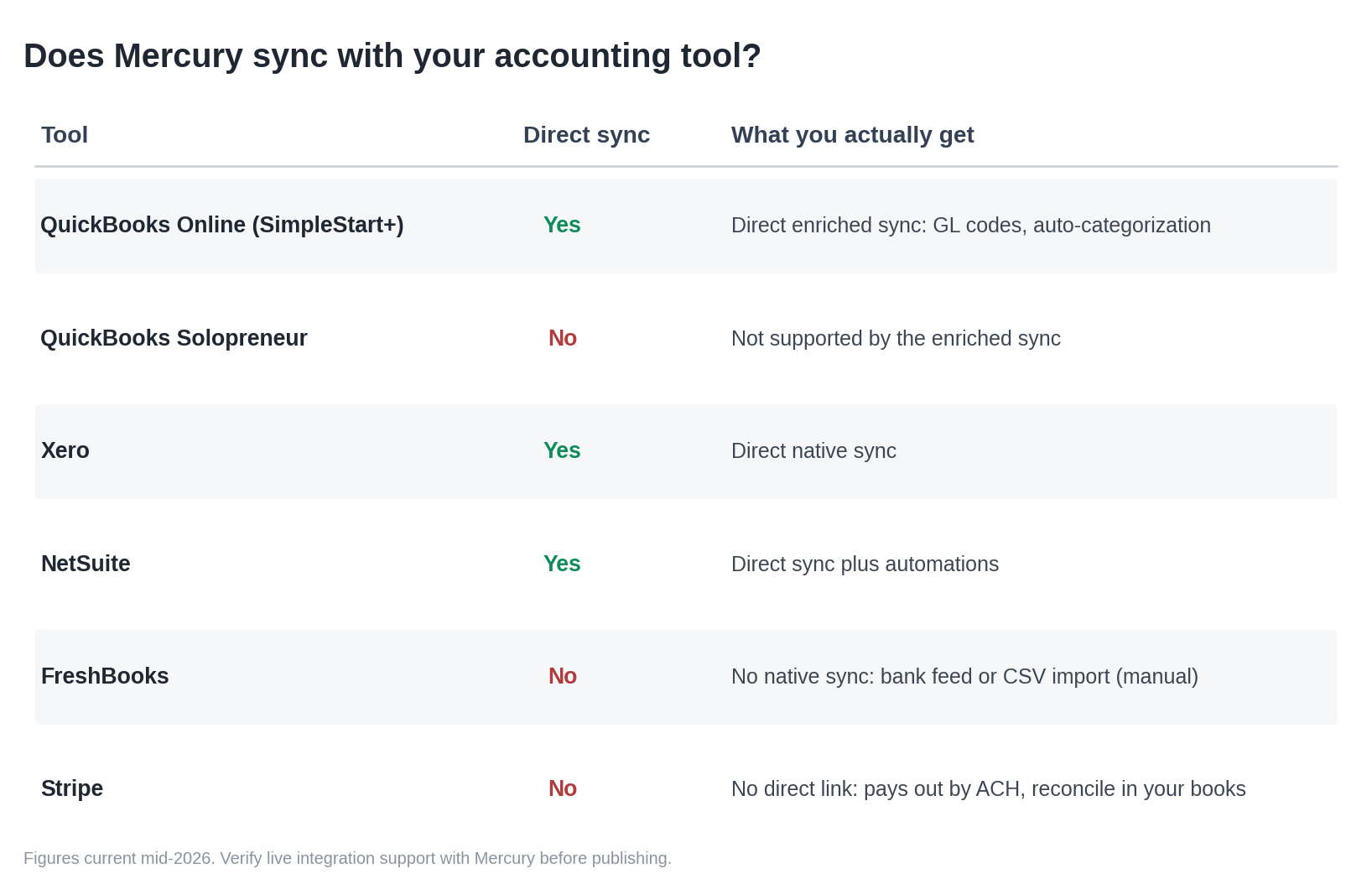
| QuickBooks Online | Yes | Direct, enriched sync (GL codes, pre-filled categories). Needs SimpleStart tier or higher; the cheaper Solopreneur plan is not supported. |
| Xero | Yes | Native direct integration. |
| NetSuite | Yes | Native direct integration. |
| FreshBooks | No | No native sync. Connect via a standard bank feed or CSV import — more manual. |
| Stripe | No | No direct link. Stripe pays out to Mercury by ACH; reconcile inside your accounting tool. |
Partly. The differences decide how much manual work you end up doing at tax time.
QuickBooks Online
Mercury has a direct, enriched integration with QuickBooks Online. It syncs transactions, assigns GL codes from your Mercury dashboard, and uses your past categorization to pre-fill codes. One catch for solo freelancers: the enriched sync needs QBO SimpleStart or higher, and the cheaper QBO Solopreneur plan isn’t supported. Pick the lowest QuickBooks tier to save money and you won’t get the full sync.
FreshBooks
This is the gap. Mercury’s only direct accounting integrations are QuickBooks Online, Xero, and NetSuite. FreshBooks has no native Mercury sync. You connect the two through a standard bank feed, or by exporting CSV files and importing them. It works, but it’s more manual than the QuickBooks path, which matters if you’re a writer or designer already living in FreshBooks. Our FreshBooks vs QuickBooks comparison covers which tool fits which kind of freelancer.
Stripe
Stripe doesn’t integrate with Mercury directly. Stripe pays out to your Mercury account by ACH, the same as any bank account. Reconciliation happens in your accounting tool, where Stripe syncs separately to QuickBooks, Xero, or FreshBooks. So the flow is simple: client pays Stripe, Stripe deposits to Mercury, your accounting software matches the payout. There’s no special Mercury-to-Stripe link to set up.
Want clean books with the least friction? Mercury plus QuickBooks Online, SimpleStart or higher, is the smoothest combination. For more on keeping records that survive an audit, see our guide to consistent accounting records and tracking business expenses.
Mercury IO and Mercury Treasury, explained for one-person businesses
These two products get name-dropped in reviews and almost never explained for solo operators. Here’s the plain version.
Mercury IO is a card, not an investment
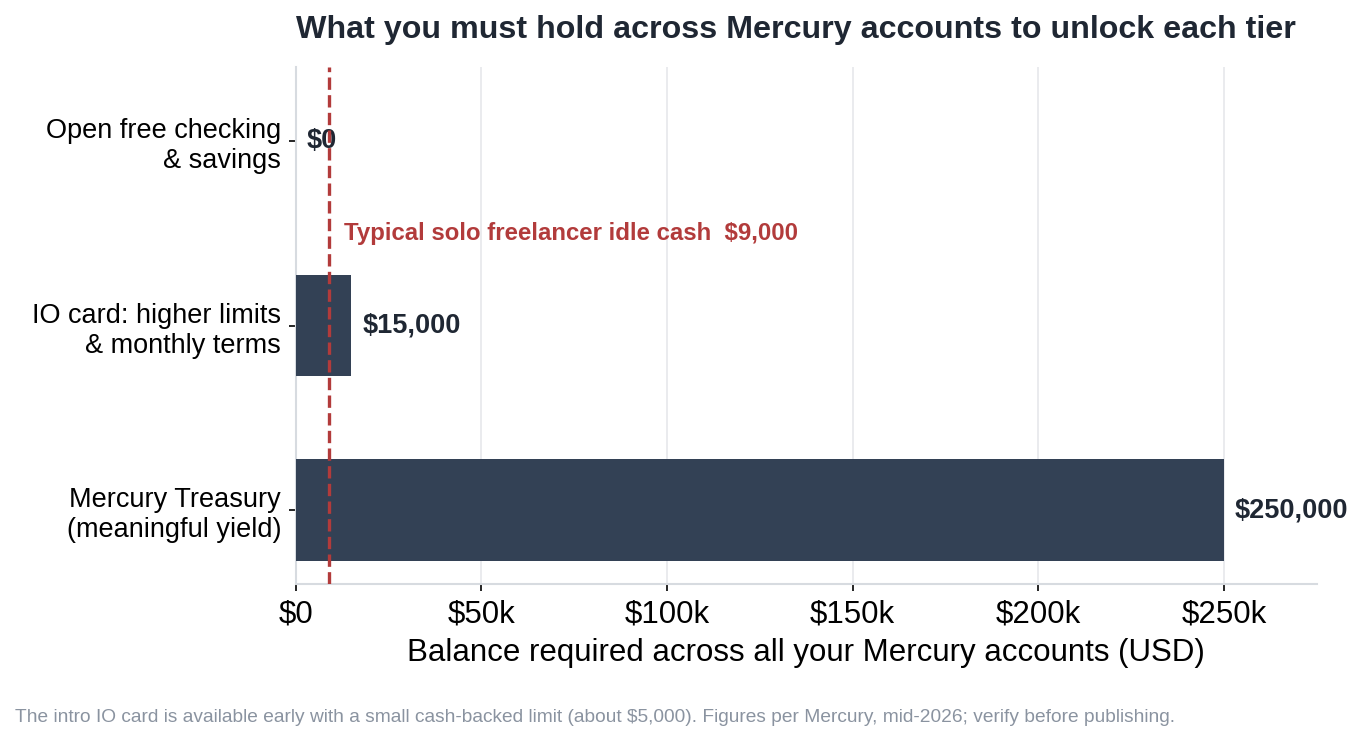
Mercury IO is a corporate charge card. It gives 1.5% unlimited cashback on settled purchases, charges no annual fee, and clears the balance automatically from your checking. There’s no traditional credit line and no interest, because it draws from your own money. The introductory card uses daily repayments and a cash-backed limit, typically up to $5,000, and you need at least $15,000 sitting across your Mercury accounts to unlock higher limits and monthly payment terms. Treat it as a cashback spending card tied to your balance. Useful, but not a credit builder.
Mercury Treasury is built for balances you do not have yet
Mercury Treasury sweeps idle cash into money market funds and short-term US government securities through Mercury Advisory, an SEC-registered adviser. It recently yielded net returns in the high-3% to mid-4% range, varying with balance and date, per Mercury’s own Treasury page. The catch for your reader is the entry point. Treasury is currently open only to accounts holding more than $250,000 across all your Mercury accounts. A freelance illustrator earning $72,000 with $9,000 sitting idle is nowhere near that bar.
Treasury is also an investment account, not FDIC-insured. It’s covered instead by SIPC up to $500,000. For most solo freelancers, Treasury simply isn’t part of the decision.
Want a yield product you can actually use? Mercury Personal, launched late 2025 at $240 a year and free for active business customers, offers savings around 3.25% APY with no minimum, plus Mercury Invest. That’s a personal account, separate from your business banking, so think of it as a side benefit rather than a reason to choose Mercury for your freelance operation.
Mercury vs Relay vs Novo for a solo freelancer
Mercury reviews feel off for freelancers because they compare Mercury to Brex and Ramp, two startup tools. The real alternatives for a solo operator are Relay and Novo. Here’s the side-by-side on the things that decide it for a one-person business.
| What matters to a solo freelancer | Mercury | Relay | Novo |
|---|---|---|---|
| Accepts a bare sole proprietor (no LLC) | No, entity required | Yes | Yes |
| EIN required | Yes | Yes | Yes (free tool to get one) |
| Cash deposits | No | Yes, at Allpoint ATMs | No (money order workaround) |
| Monthly fee | $0 (paid plan from $35) | $0 (paid plans for higher tiers) | $0 |
| Interest on your money | Minimal on checking/savings; Treasury (investment) for $250k+ balances | Savings only, roughly 0.9% to 2.68% | None |
| Separate accounts for tax buckets | Multiple checking and savings accounts | Up to 20 accounts, each its own routing number | One account plus virtual reserves |
| Native accounting sync | QuickBooks, Xero, NetSuite | QuickBooks, Xero | QuickBooks (with discount) |
| Free USD international wires | Yes | Limited | Limited |
| Best-fit freelancer | Registered LLC, paid digitally, sends USD wires | Wants strict Profit First tax bucketing | Brand-new solo, simplest free setup |
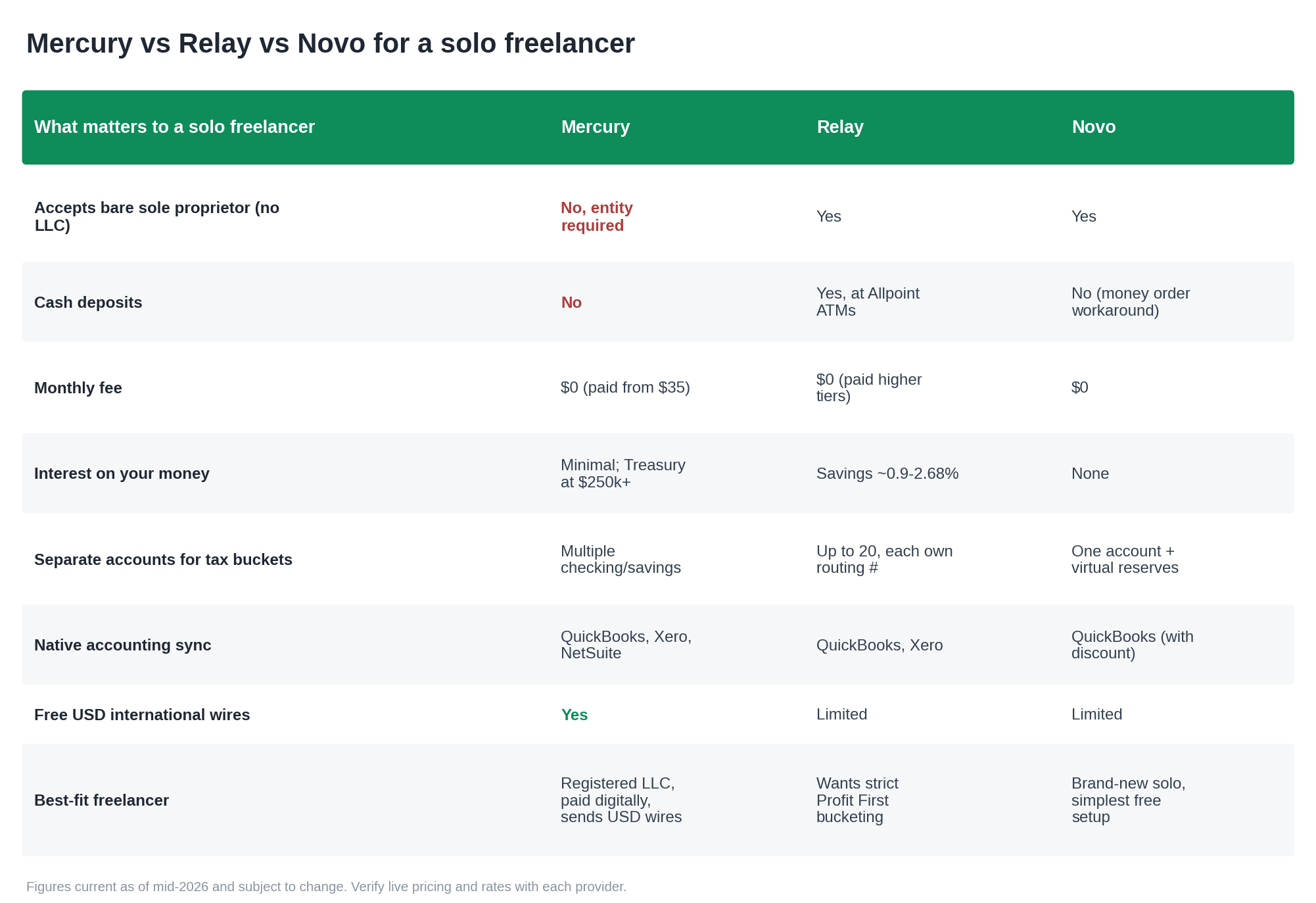
The pattern is clear. Haven’t registered an entity yet? Mercury is off the table, and Novo or Relay is your starting point. Want physically separate accounts to ring-fence your quarterly tax money? Relay’s true sub-accounts beat Mercury’s setup. If you’re a registered LLC paid digitally who values free wires and a clean interface, Mercury earns its spot. The full head-to-head across more accounts lives in our best business bank accounts for freelancers guide.
The 5-minute test: is Mercury right for your solo operation?
Run these five questions in order. Stop at the first “no.”
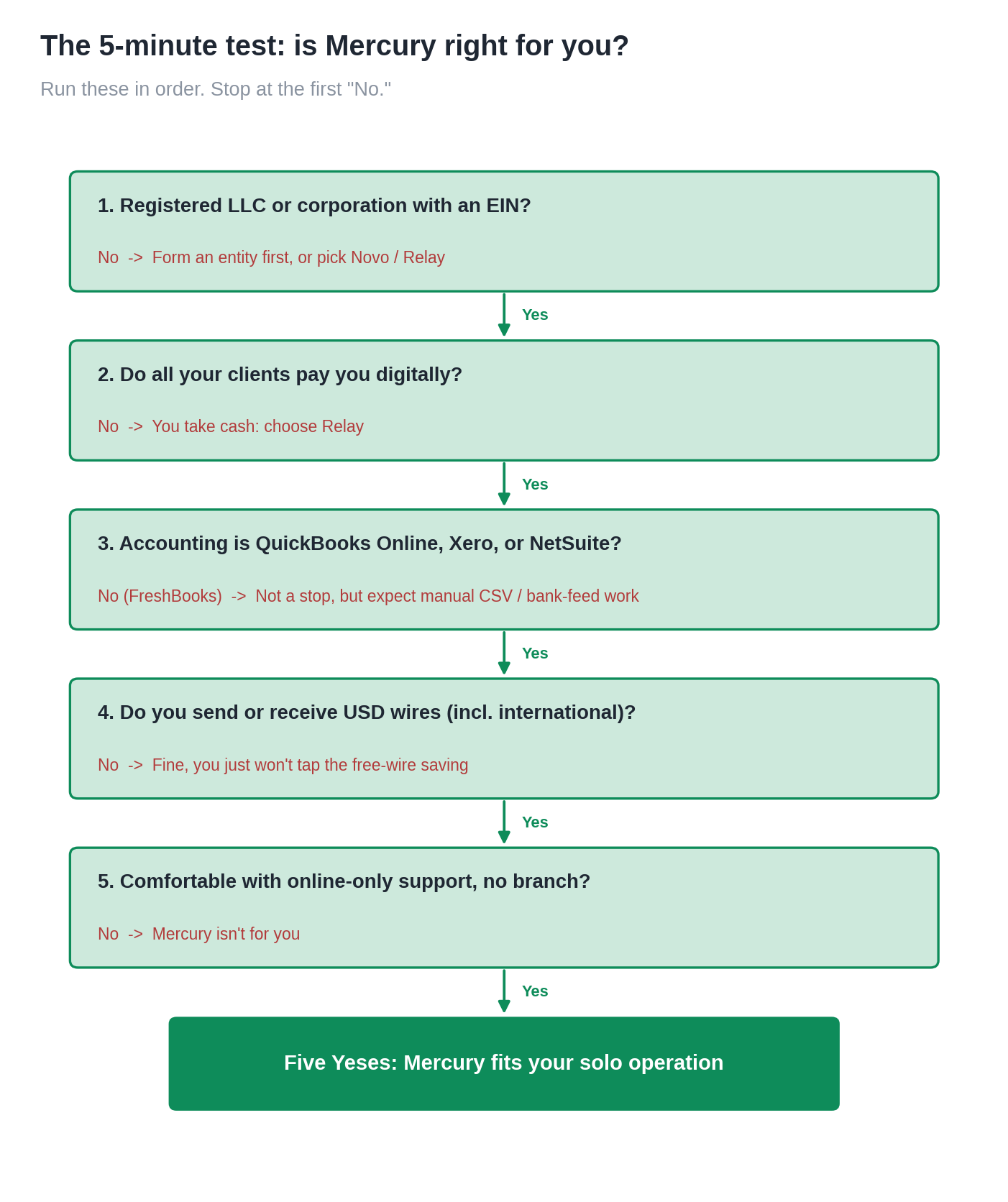
- Do you have a registered LLC or corporation with an EIN? If no, Mercury can’t open your account. Form the entity first, or pick Novo or Relay.
- Do all your clients pay you digitally? If you ever take cash, Mercury can’t accept it. That alone moves a cash-paid freelancer to Relay.
- Is your accounting tool QuickBooks Online, Xero, or NetSuite? If yes, you get clean direct sync. If you use FreshBooks, expect manual bank-feed or CSV reconciliation.
- Do you send or receive USD wires, including international ones? If yes, Mercury’s free USD wires are a genuine saving against a traditional bank.
- Are you fine with online-only support and no branch? If you need to walk into a building, Mercury isn’t for you.
Five yeses, and Mercury fits your solo operation well. That is the short answer this Mercury bank review for freelancers comes down to. A no on question one or two usually means you should be reading about Novo or Relay instead. Either way, keep your tax money separate from day one, which our guides on how much to set aside for taxes and filing quarterly estimated taxes walk through.
Get the free business account setup checklist

One page. The exact order to open a freelance business account, set up a separate tax bucket, and connect your accounting tool without the year-end scramble. It includes the EIN and entity steps Mercury requires, plus what to set aside from every invoice. Enter your email and it lands in your inbox.
Mercury bank review for freelancers: FAQ
Is Mercury good for freelancers?
Mercury works well for freelancers who’ve registered an LLC or corporation, get paid digitally, and want free USD wires with a clean interface. It’s a poor fit if you operate as a bare sole proprietor with no entity, take cash payments, or rely on FreshBooks for accounting. The free tier covers everything a typical solo operator needs, so most freelancers never pay the $35 monthly plan.
Can a sole proprietor open a Mercury account?
Not as a bare sole proprietor. Mercury requires an EIN and formation documents like Articles of Organization, which a sole proprietor with no registered entity doesn’t have. Register a single-member LLC and get an EIN, and you can qualify. If you want to stay unincorporated, Novo and Relay both accept sole proprietors and are the more realistic options.
Is Mercury a real bank and is my money safe?
Mercury is a financial technology company, not a chartered bank. Your deposits sit at FDIC-insured partner banks, currently Choice Financial Group and Column N.A., with coverage extended through a sweep network. One partner, Choice Financial Group, is under a federal consent order, which doesn’t remove FDIC protection but is worth knowing. Mercury applied for its own bank charter in December 2025, still pending as of mid-2026.
Does Mercury charge monthly fees?
No. The standard Mercury account has no monthly fee, no minimum balance, no overdraft fee, and no per-transaction fee. Domestic and international USD wires are free, with a 1% conversion fee on non-USD transfers. A paid plan starts at $35 a month for advanced features most solo freelancers don’t need.
Can I deposit cash with Mercury?
No. Mercury is online only and doesn’t accept cash deposits anywhere. You can withdraw cash at Allpoint ATMs, but there’s no way to put physical cash into the account. If a client ever pays you in cash, you’d need a different account, such as Relay, which accepts cash deposits at Allpoint locations.
Does Mercury integrate with QuickBooks and FreshBooks?
Mercury has a direct sync with QuickBooks Online (SimpleStart tier or higher), Xero, and NetSuite. FreshBooks has no native integration, so you connect it through a standard bank feed or CSV import, which is more manual. Stripe isn’t connected to Mercury directly either. Stripe just pays out to your Mercury account by ACH and reconciles inside your accounting software.
What is Mercury IO?
Mercury IO is Mercury’s corporate charge card, not an investment product. It gives 1.5% unlimited cashback, charges no annual fee, and pays off automatically from your checking balance each month. The introductory limit is typically up to $5,000 and is backed by the cash you hold at Mercury, with higher limits available once you keep at least $15,000 across your accounts. Because it draws from your own money rather than a credit line, it doesn’t build personal or business credit.
Open Your Free Mercury Account
This article is informational only and not tax, legal, or financial advice. Pricing, interest rates, eligibility rules, and partner banks change. Verify current details on Mercury’s official site and confirm tax matters with a CPA or at IRS.gov before acting. You’ll find the same approach across our freelancer finance tool reviews, and our methodology explains how each rating is produced.

About the author
Gareth is the founder of Freelancer Profit and a Dubai-based entrepreneur with a business consulting and leadership coaching background. He built the site to give freelancers honest, independent reviews of finance and tax tools, every one researched from official documentation, current pricing, and hundreds of real user reviews across Trustpilot, the BBB, and the app stores. It’s independent research, not professional tax advice, so check your own situation with a CPA.