

One of these three tools no longer exists for new users. One only shows up once a year. One runs all year. Pick wrong and you either pay for two tools when you needed one, or lose every deduction you forgot to write down. Here is how to tell them apart in five minutes.

It’s a Sunday night in March. You have a 1099-NEC for $74,000, a debit card statement with business and grocery charges tangled together, and three browser tabs open. The Keeper vs TurboTax vs QuickBooks Solopreneur question is staring back at you, and you want to know which one to pay for.
Here’s the first thing nobody tells you. You can’t buy QuickBooks Self-Employed anymore. Intuit stopped selling it to new customers in March 2024 and now points everyone to a replacement called QuickBooks Solopreneur. If you’re searching for it, you’re already behind the change. That’s fine. The replacement and the two real alternatives are what this page is about.
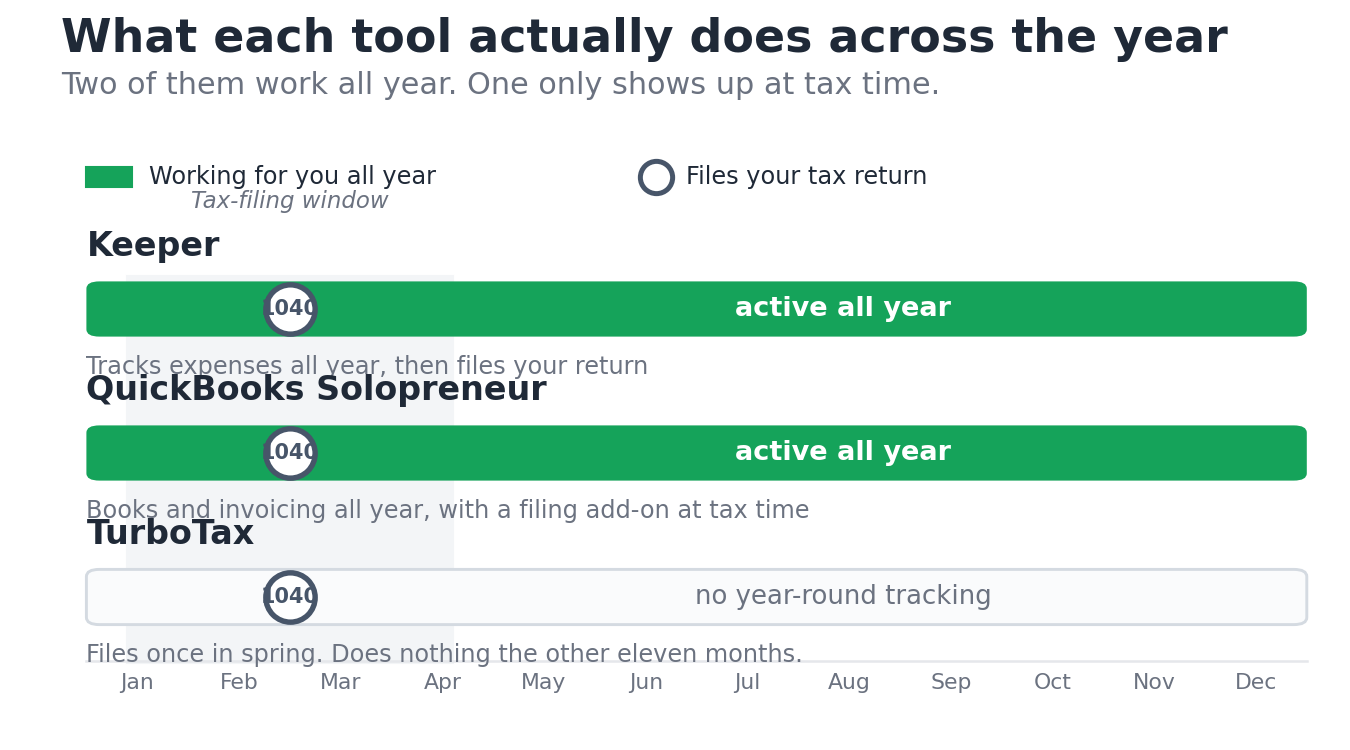
The second thing nobody tells you is harder to spot. These three aren’t competitors the way a “versus” search makes them sound. One tracks your expenses all year and files your return. One only files your return, once, in spring. One does the bookkeeping all year and now adds a TurboTax-powered filing option at the end. Choosing between them starts with knowing which job you actually need done. If you’re comparing more than these three, our roundup of AI finance tools for freelancers maps the wider category.
QuickBooks Self-Employed is gone. Here is what replaced it
Intuit discontinued QuickBooks Self-Employed for new sign-ups in March 2024 and replaced it with QuickBooks Solopreneur. Existing subscribers were grandfathered in and can keep using their accounts, but if you try to sign up today you land on Solopreneur instead. The old mobile app was pulled from the App Store for re-download on March 24, 2024, a date Intuit confirms in its own Solopreneur transition documentation.
Solopreneur runs about $20 a month, less if you prepay for the year. It does the same core jobs the old product did: it connects your bank and card, sorts transactions into business and personal, tracks mileage by GPS, sends basic invoices, and estimates your quarterly tax payments. Filing isn’t included in the monthly fee. Solopreneur now offers an integrated filing path called QuickBooks Live Tax, powered by TurboTax with live expert help, which you pay for when you file.
Freelancers on r/freelance and r/tax spent years describing QuickBooks Self-Employed as clunky and slow to fix mistakes. Solopreneur cleaned up the interface but kept the same limits. There’s no real double-entry accounting, no inventory, and reporting stays thin. If you outgrow it, Intuit wants you on QuickBooks Online, which costs more and is built for businesses with employees, not solo Schedule C filers. If you want lighter options before paying for that, compare the best accounting software for freelancers first.
Keeper vs TurboTax: which one actually files your taxes?
Both of them file. That’s the part most comparisons get wrong, lumping Keeper in with bookkeeping apps. Keeper tracks expenses all year and files your federal and state returns inside the same app. TurboTax doesn’t track anything during the year. It opens in January, walks you through your return, and closes again.
What Keeper does
Keeper links your bank and card through Plaid, then uses its own categorization to flag likely business write-offs as they happen. It texts you to confirm a charge was for work. At tax time it pulls those deductions straight onto your return and a human tax pro reviews it before you file. The pitch is that you stop losing deductions you forgot to record, which is the single most expensive habit in freelance bookkeeping. It belongs to the same group of automated trackers we cover in our AI bookkeeping tools roundup.
The complaints are consistent across the App Store, BBB, and Reddit. People get charged after the 14-day free trial because the trial doesn’t let you file, so the value only shows up after the card is hit. Multi-state returns are where users report the most filing errors. Support is in-app chat and email with no phone line, and reviewers describe getting passed between reps when something breaks. Long-term users also say the annual price has climbed over the years, with the top Premium tier now at $399, a figure you can confirm on Keeper’s own plan comparison page.
What TurboTax does
TurboTax is the most widely used DIY filing software in the US, and the self-employed tier is now called TurboTax Do It Yourself Premium. It combined the old Self-Employed and Premier products. The interview format is the best in the category, the deduction prompts are thorough, and it imports last year’s return automatically. If your situation is messy, with investment income or rental property on top of freelance work, it handles all of it in one place.
The catch is that it does nothing for you between filings. You still have to assemble your income and expenses yourself, from a spreadsheet, from Solopreneur, or from Keeper. TurboTax Premium runs about $139 for federal on Intuit’s official pricing page, and Intuit raises prices as April approaches, so the figure you see in December is lower than the one on April 10th. State returns cost extra, somewhere around $40 to $65 each depending on timing and any active discount.
The comparison nobody makes clear
Here’s the side-by-side that actually matters, built around the job each tool does rather than a feature checklist. Pricing is current as of June 2026. Always check the live pricing page before you pay, because all three change their rates through the year.
| What you need | Keeper | TurboTax Premium | QuickBooks Solopreneur |
|---|---|---|---|
| Status for new users | Available | Available | Replaced QuickBooks Self-Employed in March 2024 |
| What it actually is | Year-round AI expense tracker that also files | Once-a-year filing software | Year-round bookkeeping, plus a TurboTax-powered filing add-on |
| Tracks expenses all year | Yes, automatic | No | Yes, automatic |
| Files your federal return | Yes | Yes | Yes, via QuickBooks Live Tax (TurboTax), paid at filing |
| Files state returns | Federal + up to 2 states on Standard; 3+ states needs Premium | Yes, about $40 to $65 per state | Through Live Tax filing |
| Mileage tracking | Manual | No | Yes, GPS |
| Invoicing | No | No | Yes, basic |
| Human tax pro review | Yes, included on filing plans | Extra fee (Live Assisted) | Through Live Tax filing |
| Price, 2026 | $20/mo deductions-only; $199/yr Standard (tracking + filing, federal + up to 2 states); $399/yr Premium (adds 3+ states) | ~$139 federal + ~$40 to $65/state, rises near deadline | ~$20/mo, plus filing cost at tax time |
| Best for | Freelancers who never log expenses and want one app to do both | Anyone who keeps their own books and just needs to file | Solo owners who want clean books and invoicing year-round |
What each one costs in 2026 for a real freelancer
Take a freelance illustrator making $72,000 with a normal pile of business expenses and one state return. Three realistic paths:
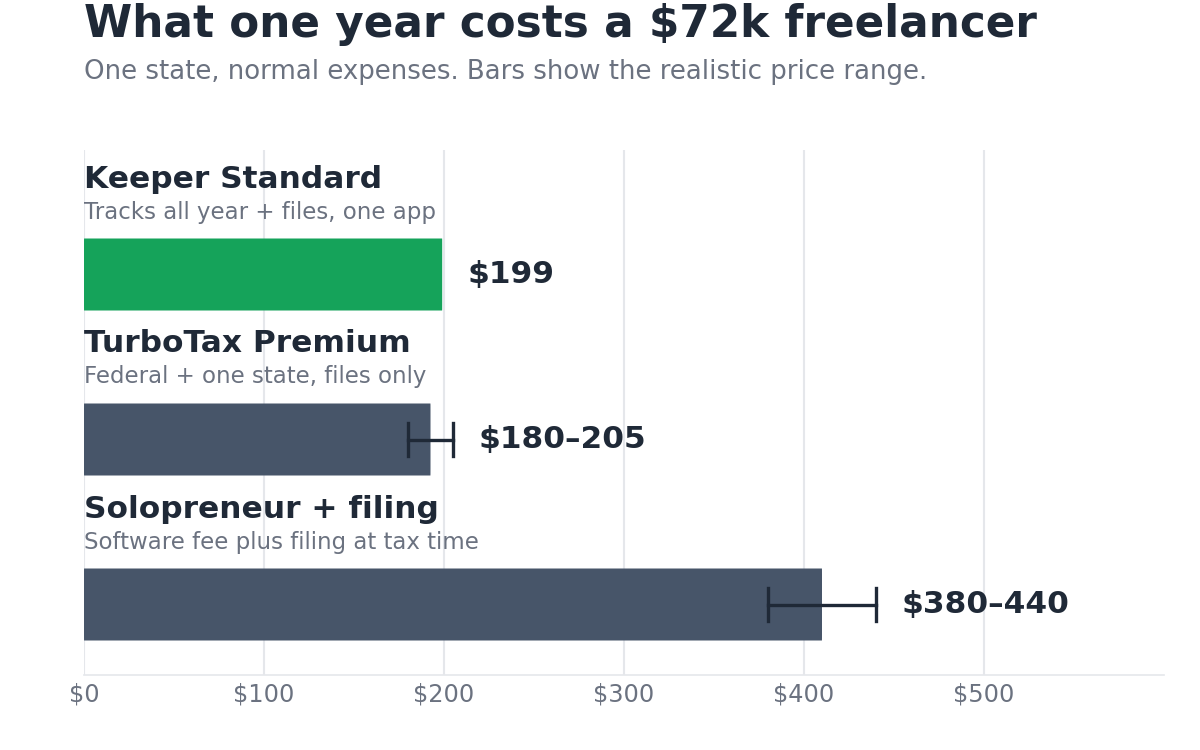
- Keeper, all in: the $199 a year Standard plan covers the tracking and the federal and up to two state returns. Total for the year: $199, plus the time you save not reconstructing receipts in April.
- TurboTax alone: about $139 federal plus roughly $40 to $65 for one state return, so call it $180 to $205, with nothing tracking your expenses the other eleven months. You supply the numbers.
- Solopreneur plus filing: $20 a month for Solopreneur (up to about $240 a year, less if you prepay) plus the TurboTax-powered filing cost at tax time, so roughly $380 to $440 combined. You get year-round books and invoicing, but you pay for both the software and the filing.
Now take a freelance developer making $110,000 with clients in three states. Three states puts you past Keeper’s $199 Standard plan, which files federal plus up to two states. You would need Keeper’s $399 Premium plan to file three. Multi-state returns are also Keeper’s most reported error pattern, so many freelancers in this spot file with TurboTax instead, at roughly $40 to $65 per state, and handle the bookkeeping themselves. A part-time writer earning $28,000 on the side barely has enough expenses to justify any tracker and could file federal plus state for under $200 with TurboTax, or for nothing through free options like Cash App Taxes.
The mistake freelancers make choosing between these
The recurring mistake, visible across r/tax and r/freelance threads, is treating the filing software as the thing that saves money. It isn’t. The money is in the deductions you capture during the year, and filing software captures none of them. You can buy the best filing tool on the market and still hand it a list of income with half your write-offs missing.
An illustrator who forgets $4,000 of legitimate expenses pays self-employment tax of 15.3% plus income tax on money that was never taxable. That’s real cash, often more than the price of every tool on this page combined. So the question isn’t “Keeper or TurboTax.” It’s “do I record expenses as I go, or not.” If the honest answer is no, a tracker pays for itself. If yes, you only need filing software.
The other quiet mistake is the Keeper free trial. The 14-day trial doesn’t let you file, so people poke around, forget, and get charged. If you try Keeper, set a calendar reminder for day 13. This is the most common Keeper complaint, and it’s entirely avoidable.
A 5-minute way to pick
Answer three questions honestly.
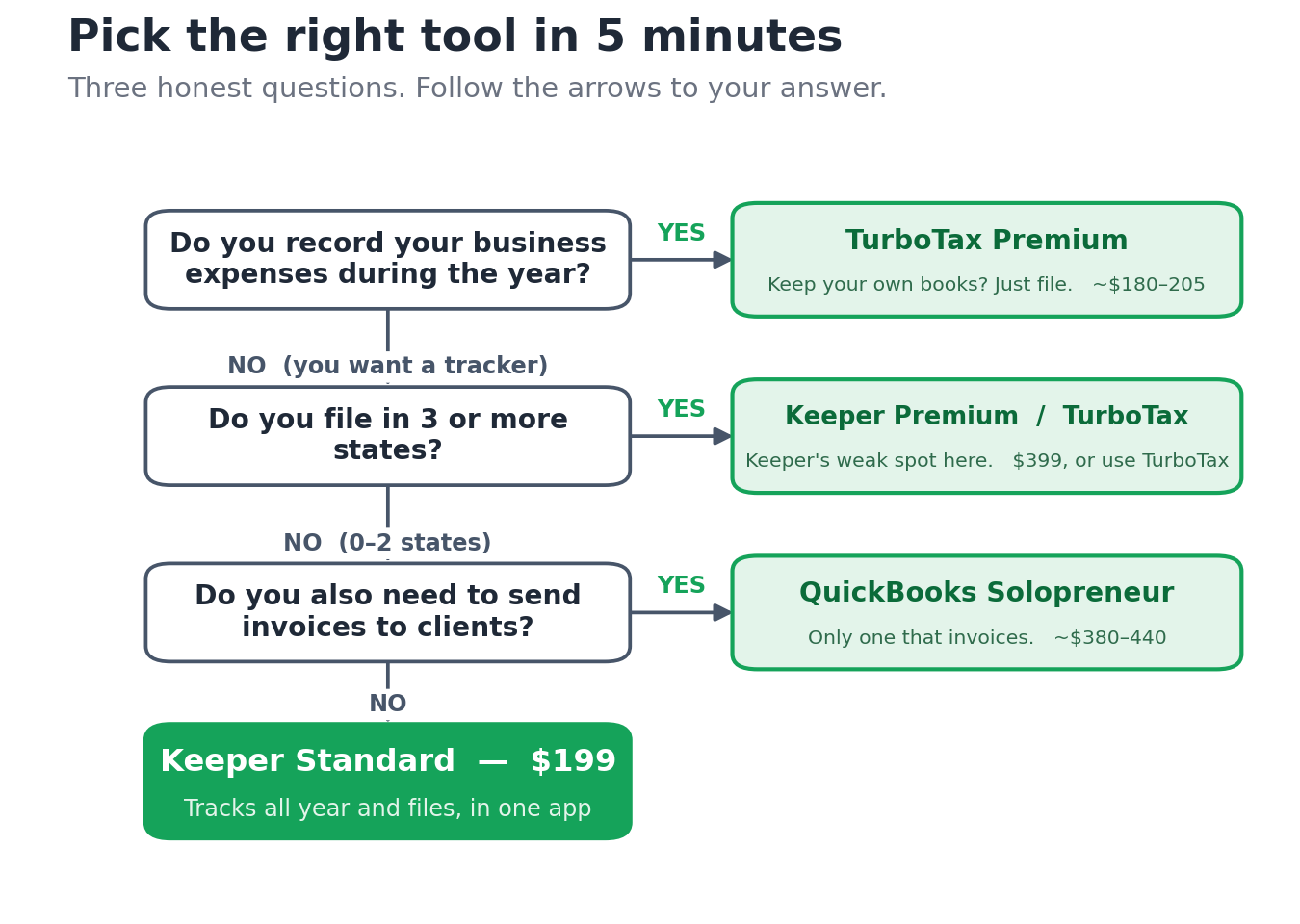
- Do you record your business expenses during the year? If no, you want a tracker. Go to question two. If yes, you only need filing software, so use TurboTax Premium and stop here.
- Do you file in three or more states? Up to two states is fine on Keeper’s $199 Standard plan. Three or more states means either Keeper’s $399 Premium plan or filing with TurboTax, and since multi-state is Keeper’s most reported error area, many people file those with TurboTax. One state or none, and Keeper’s $199 Standard does both jobs in one app.
- Do you also need to send invoices? If yes, Solopreneur is the only one of the three that invoices, so pair it with a filing path. If no, ignore Solopreneur entirely and pick between Keeper and TurboTax from questions one and two.
For most single-state freelancers who don’t track expenses, the answer lands on Keeper’s $199 Standard plan. For the disciplined ones who keep their own books, it’s TurboTax. Solopreneur wins only when invoicing matters enough to pay for two things. We rate every tool the same way, against live pricing and real user complaints, and you can see exactly how we test and rate tools. If you want the deeper breakdown of how Keeper actually performs once you’re inside it, read the full Keeper Tax review, and if you’re weighing Keeper against another AI tracker, the FlyFin vs Keeper Tax comparison covers that head-to-head. Whichever you pick, the deductions you capture matter more than the tool, so check the list of tax deductions freelancers miss most and get your quarterly estimated taxes set up before the next deadline.
The free checklist that decides this for you

The hard part isn’t the tool. It’s knowing what to track and when, so the tool has something to work with. The free Freelancer Tax Setup Checklist walks you through exactly which expenses to record, which deductions get missed most, and the quarterly dates that trigger penalties if you skip them. Drop your email and it lands in your inbox.
Frequently Asked Questions
Is QuickBooks Self-Employed still available?
No. Intuit stopped selling QuickBooks Self-Employed to new customers in March 2024 and replaced it with QuickBooks Solopreneur, which costs about $20 a month. If you already had a QuickBooks Self-Employed subscription, you can keep using it, but new sign-ups all go to Solopreneur. The mobile app for the old product was pulled from the App Store for re-download on March 24, 2024. Solopreneur does the same core jobs: expense sorting, mileage, basic invoicing, and quarterly tax estimates.
Does Keeper actually file my taxes or just track expenses?
Both, depending on the plan. The $20 a month deductions-only plan finds and categorizes deductions but doesn’t file. The $199 a year Standard plan tracks all year and files your federal return plus up to two states, with a human tax pro reviewing it first. The $399 Premium plan adds multi-state filing for three or more states, prior-year returns, amendments, quarterly tax support, and audit protection. The 14-day free trial lets you track but not file, so the filing value only appears after you subscribe.
Can I use Keeper and TurboTax together?
Yes, and it’s a common setup. You run Keeper’s $20 a month deductions-only plan all year to capture deductions, then export the totals and file with TurboTax. This makes sense if your taxes are complex enough that you trust TurboTax’s filing more, especially with three or more states, but you still want automatic expense tracking. You pay for both, so it costs more than Keeper’s all-in Standard plan, but you get the stronger filing engine.
Is Keeper better than TurboTax for freelancers?
It depends on whether you track expenses during the year. If you never log write-offs, Keeper is better because it captures them automatically and files in one app for $199. If you keep your own books and just need to file, TurboTax is better, with a stronger interview and reliable multi-state handling. Keeper’s most reported problem area is multi-state returns, and its Standard plan tops out at two states, so freelancers filing in three or more states either move up to Keeper’s $399 Premium plan or file with TurboTax.
What is the cheapest way to file self-employed taxes?
For a simple single-state return, Keeper’s $199 Standard plan or TurboTax at roughly $180 to $205 are close, and free options like Cash App Taxes can handle straightforward Schedule C filings at no cost. The cheapest path overall isn’t about the filing fee. It’s capturing every deduction so you’re not taxed on money you could have written off. A missed $4,000 in expenses costs far more than any tool’s price. See our guide to the write-offs freelancers overlook.
Is QuickBooks Solopreneur the same as Self-Employed?
Close, but not identical. Solopreneur is Intuit’s replacement for Self-Employed and keeps the same core jobs: expense sorting, GPS mileage, basic invoicing, and quarterly tax estimates. It updated the interface and added features like sales estimates and goal tracking. Unlike the old product, Solopreneur adds an integrated filing path, QuickBooks Live Tax, powered by TurboTax, which you pay for when you file. The underlying limits are the same: no full double-entry accounting and thin reporting.
Tax laws and software pricing change. The figures here reflect rates published as of June 2026 and are informational only, not tax or legal advice. Verify current numbers at IRS.gov and on each vendor’s pricing page, and check with a CPA for your specific situation.
About the author
Gareth Noble is the founder of Freelancer Profit. He’s not a CPA or a bookkeeper. He spent 20 years coaching teams at companies like Amazon, P&G, and Emirates before building this site, because he couldn’t find honest, thorough reviews of finance tools written for freelancers. Every guide is researched from real user reviews, BBB complaints, official documentation, and primary sources.