


QuickBooks Self-Employed is closed to new users and no longer being built. Here is what actually transfers to Solopreneur, what you lose, and five alternatives compared on price and migration pain.
Intuit pulled the QuickBooks Self-Employed app from the App Store and Google Play on March 24, 2024. If you still use QBSE, your account works for now. New signups are closed. Intuit steers every new customer to QuickBooks Solopreneur instead, and it is not adding features to Self-Employed anymore.
So you have a decision on a timeline you did not choose. Move to Solopreneur, the product Intuit built as the replacement, or switch to something else while you are already doing the work. This piece covers what carries over, what does not, and where the other five tools actually fit.
The 30-second verdict
You want to stay inside Intuit: QuickBooks Solopreneur, $20 a month. It is the closest thing to QBSE, keeps GPS mileage tracking, and migrates most of your data automatically. Read the section below first, because the migration has documented failure cases.
You want deductions found and your return filed: Keeper ($199 a year) or FlyFin ($192 a year). Both link your bank, sort write-offs with AI, and file your Schedule C.
You mainly send invoices and chase late payers: FreshBooks, around $23 a month on the Lite plan. Better invoicing than QBSE ever had.
You want to pay nothing: Wave (free, with paid bank sync) or Zoho Invoice (free, invoicing only, up to 500 invoices a year).
What is actually happening with QuickBooks Self-Employed
Intuit never posted a dramatic shutdown notice. The product just started disappearing. In early 2024 the mobile app came off both app stores, new signups stopped, and the marketing pages redirected to Solopreneur. Intuit’s own support staff now tell people plainly that Self-Employed is no longer offered, and that existing subscribers can keep using it.
Read that last part carefully. “Keep using it” is not the same as “supported forever.” Intuit has not committed to a long-term timeline for QBSE, and it has stopped developing the product. When a company closes signups, pulls the app, and points every new user at a different SKU, the direction is clear even without a date on it.
In practice, that means three things. Your account still runs today. You cannot count on new fixes or features. And the moment you need support during a login problem or a data issue, you are dealing with a product Intuit has already moved past. People in Intuit’s own community forum have reported 403 login errors dragging on for months and support they could not reach because the help flow assumed they still had the app installed.
You do not have to move this week. You do have to plan the move on your terms rather than during a February scramble when something breaks and nobody picks up.
Before you migrate anywhere, export your data
Do this before you touch any new tool. The single biggest complaint in Intuit’s community threads is people losing records they assumed would follow them. They did not. And once you upgrade, Intuit’s own migration guide warns you will no longer be able to access your old QBSE account at all.
Export your transactions as a CSV. In QBSE, open the Transactions menu, set the Type, Account, and Time period filters, then use the Export icon. One catch matters more than any other: receipts do not export with the transaction file. Intuit confirms this in its own help thread. You have to download receipts separately, and you do it per tax year from the Reports menu.
- Transactions: export a CSV for every year you want to keep, not just the current one. Some migration paths move only a single year.
- Receipts: download them per tax year from Reports. They will not ride along with the CSV.
- Mileage: export your mileage log before you cancel anything. If you claimed the standard mileage rate, that log is your audit trail.
Store all of it somewhere outside QuickBooks. Once you cancel a QBSE subscription, getting historical data back is a support ticket you do not want to file. For a fuller system for keeping records clean going forward, see our guide on tracking business expenses as a freelancer. Bank feeds only work as well as the bank behind them, which is why we compared Relay and Mercury head to head on feed reliability and fees.
QuickBooks Solopreneur, reviewed straight
Solopreneur is the default path. It costs $20 a month, with a 30-day free trial and an annual billing option. It was built as the QBSE replacement, so it carries the same core idea: link your accounts, split business from personal, track mileage by GPS, and stay ready for a Schedule C filing that hands off to TurboTax. For a sole proprietor, the appeal is that your Schedule C and estimated quarterly taxes keep feeding from one place. If the filing step decides it for you, the Keeper vs TurboTax vs QuickBooks Solopreneur comparison settles that question.
Most reviews of QBSE alternatives skip Solopreneur or bury it, because it pays them nothing in affiliate commission. That gap is worth filling, because Solopreneur is genuinely the least-effort move for a lot of people, and the migration has real potholes you should know about first.
What transfers, and what does not
It depends on which path you take, and the difference is bigger than Intuit’s marketing suggests.
The automatic QBSE-to-Solopreneur migration is the good path on paper. Intuit’s support staff say it moves customers, invoices, trips, bank connections, transactions, and receipts. The catch shows up in Intuit’s own community forum: users report the automatic transfer failing outright, landing them in a Solopreneur account with no data. One documented case from early 2026 ended with support unable to restart the migration, bank connections that only pulled 90 days of history, and the user re-uploading and re-categorizing receipts by hand. Intuit’s rep called the process seamless in the same thread.
The manual path, and any move to a full QuickBooks Online plan, is where the hard limits live. Receipts do not transfer and must be re-uploaded. Past invoices do not transfer. Support has told users only one year of transactions comes across. If you have three years of scanned receipts, that is your weekend.
Either way, the protection is the same: export everything first, then verify what actually landed in the new account before you cancel QBSE.
The no-downgrade trap
Solopreneur is the cheapest tier of QuickBooks Online. If your business grows and you upgrade to a full QuickBooks Online plan later, you cannot move back down to Solopreneur. That switch only goes one way. Intuit says this is due to changes made in your books that cannot be undone; returning means a brand new subscription and a fresh setup.
One more honest note. NerdWallet’s reviewers point out that Solopreneur is a lighter version of QuickBooks Online missing a customizable chart of accounts, which means predefined categories only. For a sole proprietor filing a Schedule C, that is usually fine. If you expect to hire, take on a partner, or add inventory, Solopreneur will feel tight fast, and you are back to that one-way upgrade.
Five alternatives, compared straight
These five cover the main reasons people used QBSE. For the wider field beyond these, our roundup of the best accounting software for freelancers compares more options in depth. Done-for-you services are a different category altogether; our Bench review explains what the monthly fee actually buys.
FreshBooks, if invoicing is your real problem
Who it fits: freelancers whose midnight search is about the client who owes them $3,200 from 42 days ago, not about deductions. FreshBooks does invoicing, recurring invoices, automated late-payment reminders, and mileage tracking, all of which beat what QBSE offered.
Price: the Lite plan runs around $23 a month and caps you at five billable clients. Plus is about $43 a month and lifts that to 50. Frequent promos knock the first few months down hard, then it reverts to full price. There is a 30-day trial, no card required.
Migration effort: medium. There is no direct QBSE import, so you export your CSV and set FreshBooks up fresh. Complaint from the research: the five-client cap on Lite pushes active freelancers onto Plus within a quarter, and reviewers report losing access to historical invoices after cancelling. Read the full breakdown in our FreshBooks vs QuickBooks comparison. If invoicing matters more to you than bookkeeping, our invoicing software comparison for freelance writers ranks the tools on that alone.
Keeper, if you mix personal and business in one account
Who it fits: freelancers who never opened a separate business account and now need a year of 1099 income and its write-offs pulled out of a messy card statement. Keeper links your accounts, scans past purchases for deductions, and lets you file from your phone. It talks to you in a text-message-style chat.
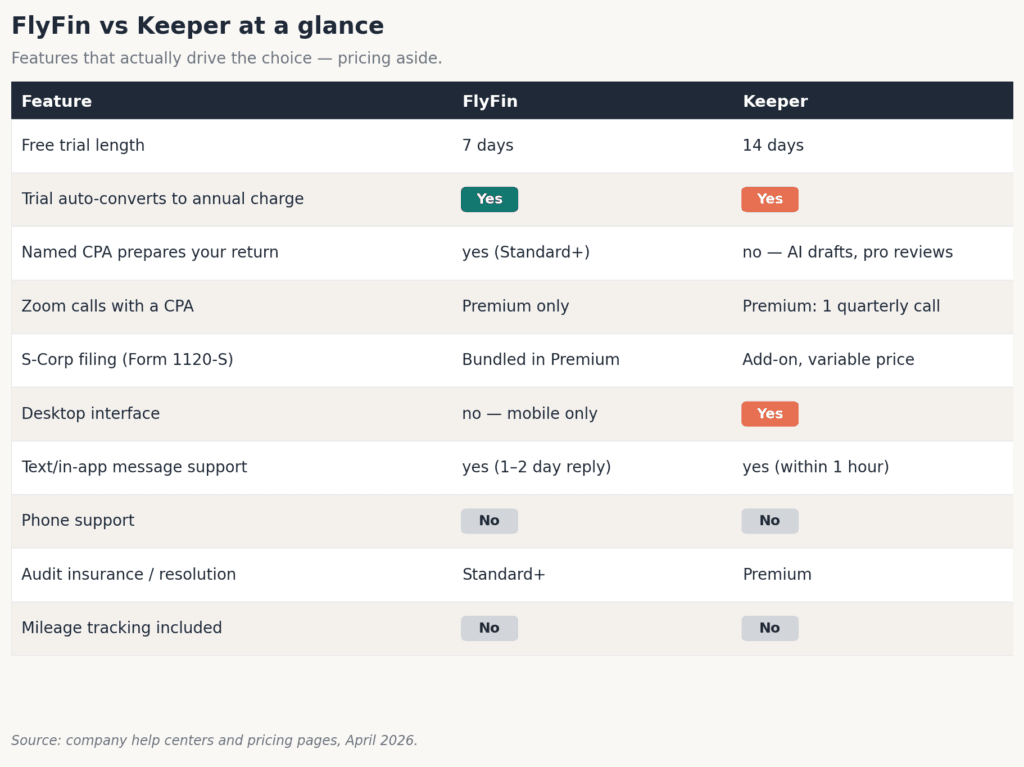
Price: around $20 a month for deduction tracking. Filing your federal and two state returns is included on the annual plan, not the month-to-month one, so check which you are signing up for. There is a short free trial that does not let you file.
Migration effort: low. You connect your bank through Plaid and Keeper categorizes historical transactions from the linked account. There is no receipt-photo library and no GPS mileage, so if those were the two things you used QBSE for, Keeper is not a straight swap. Complaint from the research: exporting a clean year-end report can be a hassle. Full write-up in our Keeper review.
FlyFin, if you want AI plus a real CPA to file
Who it fits: higher-volume freelancers who want the deductions found automatically and a human CPA to prepare and file the return. FlyFin uses a swipe-to-confirm interface and assigns you a CPA.
Price: Standard is $192 a year, Premium is $348 a year and adds S-Corp filing and video calls. There is a 7-day trial. Note that FlyFin bills annually up front once the trial ends.
Migration effort: low. Connect your bank and start fresh. Complaint from the research, and it is consistent: reviewers report a surprise annual charge landing during the trial, slow CPA response at the March and April crunch, and a mobile-only experience that frustrates anyone who wanted to work on a laptop. No invoicing at all. Full detail in our FlyFin review.
Wave, if your budget is the constraint
Who it fits: freelancers on a tight budget who mostly need to send invoices and keep basic books. Wave’s free Starter plan covers unlimited invoices and basic accounting. Receipt scanning is not free anymore. Wave moved it to a paid add-on at $8 a month billed annually, or it comes bundled into the Pro plan.
Price: the core is genuinely free. The catch is that automatic bank imports and transaction categorization now sit on the Pro plan, which is $16 a month billed annually or $19 month to month. Payment processing runs 2.9% plus $0.60 per card transaction.
Migration effort: medium. No QBSE import, and on the free plan you enter transactions by hand, which is a real step back from the auto feed you had in QBSE. Complaint from the research: bank syncing through Plaid can drop, and support responsiveness is a recurring gripe. If your interest is the AI-driven expense side, compare it against the field in our guide to AI bookkeeping for freelancers.
Zoho Invoice, if you only need to get paid
Who it fits: freelancers who handle taxes elsewhere and just need to send clean invoices and collect payment. Zoho Invoice is free forever, with up to 500 invoices a year and up to two users.
Price: nothing. The free tier adds a small “Powered by Zoho Invoice” line to your invoices, and it caps at those 500 invoices a year, which almost no solo freelancer will hit.
Migration effort: low, because there is nothing to migrate. Here is the honest limit: Zoho Invoice does invoicing only. No bank reconciliation, no expense categorization, no deduction tracking. It will not replace the tax side of QBSE, so you would pair it with a tax tool like Keeper or FlyFin. We put it head to head with the free option most people compare it against in our Wave vs Zoho Invoice guide.
Side by side: price, mileage, Schedule C, migration, receipts
| Tool | Price | Mileage tracking | Schedule C support | Migration difficulty | Receipt handling |
|---|---|---|---|---|---|
| QuickBooks Solopreneur | $20/mo | Yes (GPS) | Yes, files via TurboTax | Low (auto-migrate, but see notes) | Capture yes; verify receipts landed after migrating |
| FreshBooks | ~$23/mo (Lite) | Yes | Export and categories, no direct filing | Medium (manual, no QBSE import) | Receipt capture yes |
| Keeper | $199/yr | No | Yes, files 1040 and Schedule C (annual plan) | Low (bank link, no history import) | Transaction-based, limited receipts |
| FlyFin | $192/yr (Standard) | No | Yes, CPA files | Low (bank link, start fresh) | Transaction-based, no receipt library |
| Wave | Free; $16-19/mo Pro | No | Reports and export, no filing | Medium (manual entry on free plan) | Receipt scanning is a paid add-on ($8/mo annual) or Pro |
| Zoho Invoice | Free | No | No | Low (nothing to migrate) | No |
One pattern jumps out of that table. If GPS mileage tracking was a feature you actually used, only Solopreneur and FreshBooks carry it. Everyone else expects you to log miles in a separate app. That single row decides the question for a lot of drivers.
Get the QBSE export and migration checklist
The part people get wrong is the export, not the choice of tool. This one-page checklist walks you through pulling your transactions, receipts, and mileage log out of QBSE in the right order, so nothing gets stranded when you cancel. Enter your email and it lands in your inbox.
Frequently asked questions
Is QuickBooks Self-Employed being discontinued?
Intuit closed QuickBooks Self-Employed to new customers and pulled the app from the App Store and Google Play in early 2024. Existing subscribers can keep using their accounts for now, but Intuit is no longer developing the product and points all new users to QuickBooks Solopreneur. There is no published long-term support timeline, so the safe read is to plan your move rather than wait for a shutdown date.
Does my data transfer from QuickBooks Self-Employed to Solopreneur?
On the automatic migration path, Intuit says customers, invoices, trips, bank connections, transactions, and receipts move across. Users in Intuit’s community have reported that migration failing and needing to re-upload receipts by hand, and manual or QuickBooks Online paths carry hard limits: no receipts, no invoices, and in some cases only one year of transactions. Export a CSV of every year, plus receipts per tax year and your mileage log, before you cancel anything, then verify what landed.
Can I go back to QuickBooks Self-Employed after switching?
No. New signups for Self-Employed are closed, so once you leave, you cannot come back to it. Separately, if you move up from Solopreneur to a full QuickBooks Online plan later, you cannot downgrade back to Solopreneur. Both are one-way. Decide before you cancel, not after.
What is the closest free alternative to QuickBooks Self-Employed?
Wave is the closest free option, with unlimited invoicing and basic accounting at no cost. Two trade-offs come with the free tier. Automatic bank imports sit behind the $16 to $19 a month Pro plan, so the free version means entering transactions by hand. Receipt scanning is also no longer free, running $8 a month billed annually or bundled into Pro. Zoho Invoice is also free but handles invoicing only, with no expense or tax side.
Which alternative keeps automatic mileage tracking?
Only QuickBooks Solopreneur and FreshBooks include built-in GPS mileage tracking. Keeper, FlyFin, Wave, and Zoho Invoice do not, so with any of those you would track miles in a separate app such as Stride or MileIQ and enter the deduction at tax time. If mileage was a core reason you used QBSE, that narrows your choice quickly.
Do this week: before you pick anything, log into QBSE and export your data. Pull a CSV of every tax year, download your receipts per year from the Reports menu, and save your mileage log. That export is the part people lose, and it takes 20 minutes now versus a support ticket later.
This article is informational only and not tax or legal advice. Software pricing, plans, and product availability change often, and tax rules change every year. Verify current pricing on each vendor’s site and current tax thresholds at IRS.gov, and speak with a CPA or enrolled agent about your own situation. Pricing and product details here reflect published rates as of July 2026. See our methodology for how these reviews are researched.
About the author
Gareth Noble is the founder of Freelancer Profit. He’s not a CPA or a bookkeeper. He spent 20 years coaching teams at companies like Amazon, P&G, and Emirates before building this site, because he couldn’t find honest, thorough reviews of finance tools written for freelancers. Every guide is researched from real user reviews, BBB complaints, official documentation, and primary sources.