

Most graphic designers deduct the Adobe subscription and stop. The full list below can take $3,000 to $8,000 off your taxable income, depending on what you bought this year — and it stacks on top of setting the right rate in the first place.
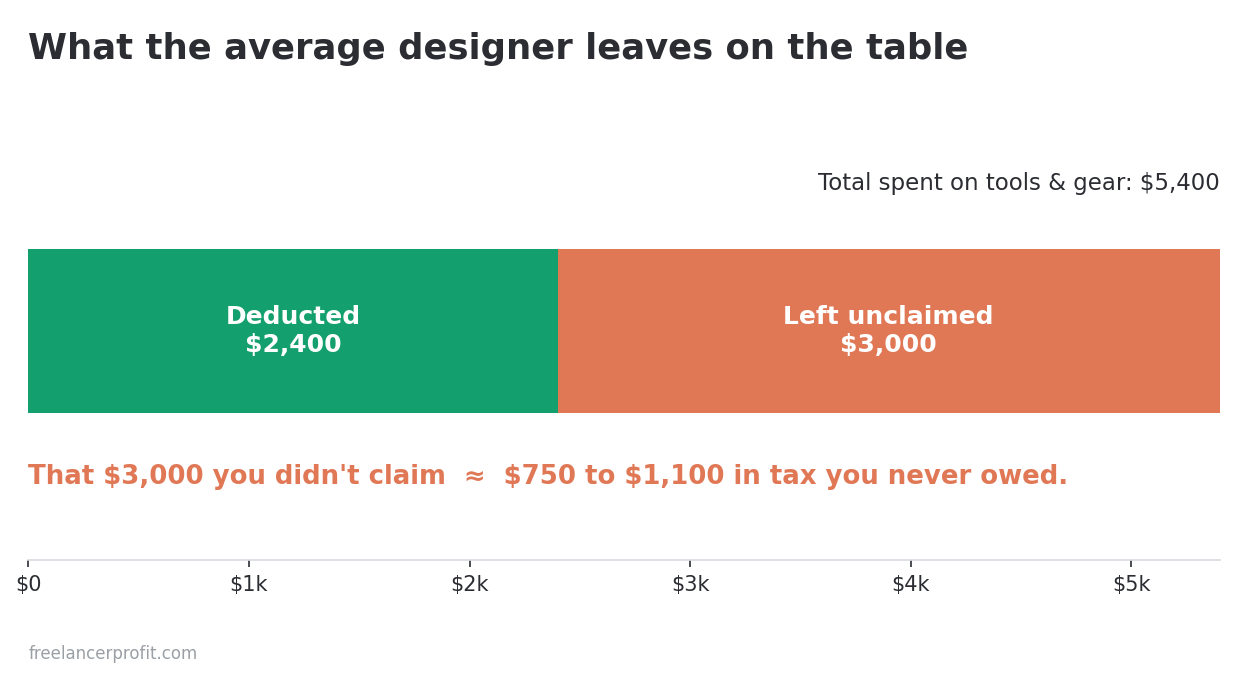
Tax deductions for freelance designers come down to one habit: claiming everything your work actually costs you. You spent about $5,400 on software, fonts, stock assets, and gear last year. You deducted the Creative Cloud subscription, maybe the new monitor, and you called it done. The right invoicing and expense tool tags these as you go, so they don’t get lost. The other $3,000 sat in your bank statements, unclaimed, quietly handing the IRS money you never owed.
This is the most common pattern I see with self-employed designers. Not aggressive deduction. The opposite. You under-claim because you’re not sure a font license or an iPad counts, and you’d rather miss a real write-off than risk claiming a fake one.
Every dollar you fail to deduct costs you more than a dollar of income. A graphic designer netting $72,000 pays 15.3% self-employment tax on top of federal income tax. A missed $3,000 deduction is roughly $750 to $1,100 in tax you didn’t have to pay. If you’re still guessing at what to hold back each quarter, sort out how much freelancers should set aside for taxes first, then come back to this. So this guide to tax deductions for freelance designers goes line by line through what designers can write off, what documentation each one needs, and the handful of deductions that get people audited.
What actually counts as a graphic designer tax deduction
The IRS standard is two words: ordinary and necessary. Ordinary means common in your line of work. Necessary means helpful and appropriate for the business. A Wacom tablet clears both for a designer. A jet ski does not. That’s the whole test, and it’s more forgiving than most designers assume.
You report these on Schedule C. Software and subscriptions usually land on line 27a (other expenses) or line 18 (office expense). Supplies go on line 22. Larger equipment runs through line 13 and Form 4562. The home office sits on line 30. If those line numbers mean nothing yet, the line-by-line Schedule C walkthrough covers each one with real figures.
One rule underpins all of it. The expense has to be for the business, and you need to be able to prove it if asked. Keep the receipt, keep the bank or card statement, and keep a short note of the business purpose for anything that could look personal. That’s the entire compliance burden for most of what follows.
Software subscriptions: the deductions you get partly right
Software is the easiest category and the one designers still leave money on. You probably deduct Adobe. You probably forget the other six tools you pay for.
Adobe Creative Cloud
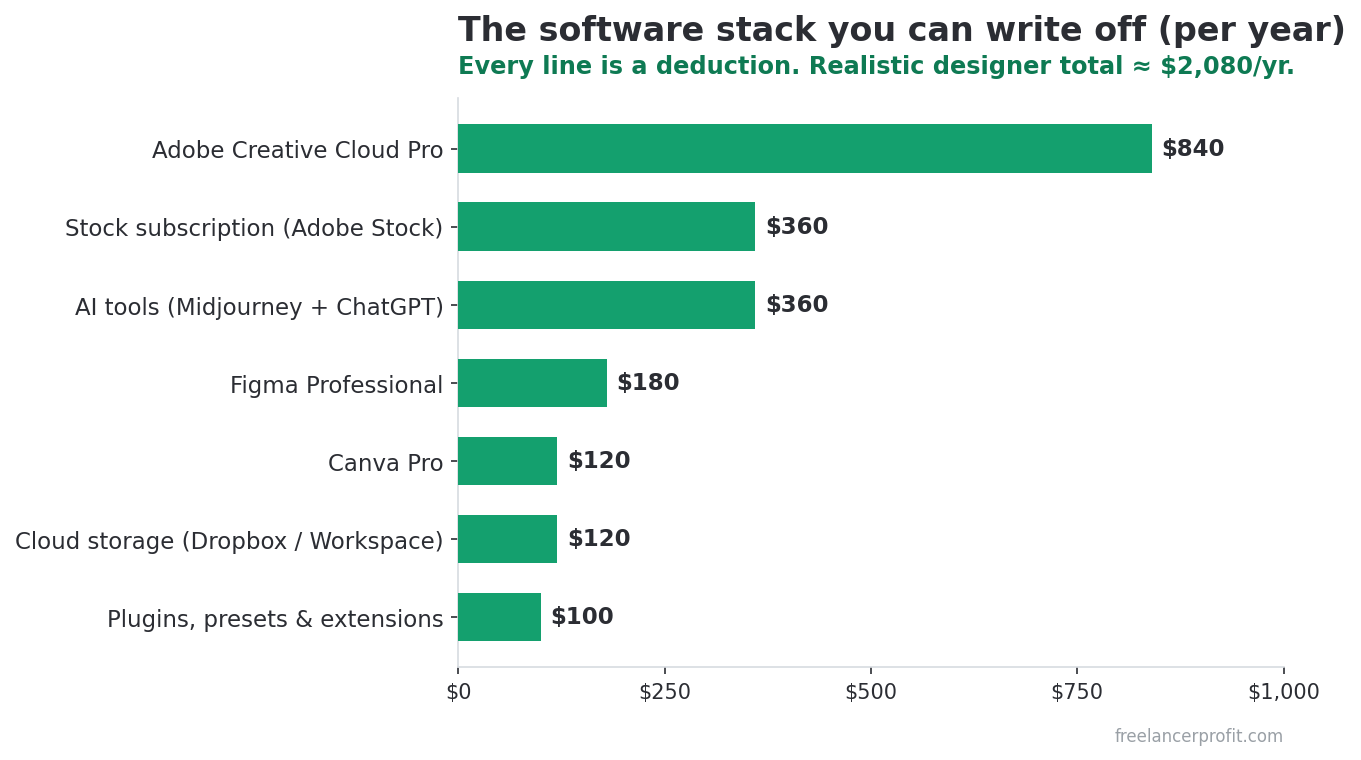
Fully deductible if you use it for client work. Adobe renamed and split the old All Apps plan in August 2025: Creative Cloud Standard now runs about $660 a year, and Creative Cloud Pro about $840. Whichever you pay for, that whole amount comes off your taxable income. If you also run Photoshop on a personal device for hobby projects, you don’t have to split it, because the subscription is tied to your business use, not the hardware it sits on.
One detail worth knowing: Adobe Fonts is included inside that subscription. You don’t deduct it separately, because you never paid for it separately. Designers sometimes try to list it as its own line. It’s already inside the Creative Cloud number.
Figma, Sketch, Affinity, and the rest
All deductible. Figma Professional runs about $144 to $192 per editor per year, depending on the seat type. Sketch is around $120 a year. Affinity is the odd one now: Canva merged Designer, Photo, and Publisher into a single free app in October 2025, so there’s no license left to deduct. If you pay for Canva Pro (about $120 a year) to get the AI tools, that subscription is the deductible part. The recurring tools are simple subscriptions you expense in full each year.
Bundle the smaller tools too. A UX designer might run Figma, Maze, Notion, Loom, and a Webflow plan. Each is modest on its own. Together they often clear $1,000 a year, and every one of them is a write-off. If you’re still picking your stack, the roundup of accounting software for freelance designers covers how to keep these subscriptions clean for tax time.
The subscriptions designers forget
- Cloud storage. Dropbox, Google Workspace, or iCloud+ used to deliver client files. Deductible at the business-use share.
- Project and invoicing tools. A FreshBooks or Bonsai plan, your scheduling app, your password manager.
- AI tools. Midjourney, a ChatGPT Plus seat, or an upscaler you use on client work. New category, same rule.
- Plugins and extensions. A paid Figma plugin, a Lightroom preset pack, a mockup generator.
Can I deduct fonts and stock assets I buy for client work?
Yes, and this is the category designers miss most. Fonts, stock photos, icons, mockups, and templates are deductible when you buy them for business use. They’re about the clearest example of ordinary and necessary that a designer has.
Font licensing covers a desktop license from MyFonts, a typeface family from Monotype (which now owns Hoefler & Co.), or a webfont subscription. A single display family can run $200 to $600. If you bought three for one rebrand project, that’s real money and a real deduction. Keep the license receipt, because font licensing is also where audits over usage rights start, separate from tax.
Stock and asset subscriptions count too. Adobe Stock, Shutterstock, Getty, Unsplash+, Envato Elements, and Creative Market purchases are deductible. A designer paying $30 a month for Adobe Stock and buying the odd one-off image is deducting somewhere near $450 a year that often goes unclaimed. Record what you bought and which project it served if it could read as personal.
Hardware: why the Section 179 debate barely matters for you now
Designers buy expensive gear. A Wacom Cintiq, an iPad Pro with an Apple Pencil, a color-calibrated monitor, a fast Mac, a graphics card, an external drive. The old advice told you to agonize over Section 179 versus multi-year depreciation. For most freelance designers in 2026, that choice is now mostly irrelevant, and here’s why.
You have three ways to write off equipment, and the first two cover almost everything a solo designer buys.
De minimis safe harbor: anything $2,500 or under
The de minimis safe harbor lets you expense any item costing $2,500 or less in the year you buy it, with no depreciation math at all. The threshold is $2,500 per item or per invoice for taxpayers without an applicable financial statement, which describes essentially every solo freelancer. An iPad Pro, an Apple Pencil, a $1,200 monitor, a $400 graphics tablet: each gets deducted in full, this year.
There’s one administrative step. You attach a short statement to your return titled the Section 1.263(a)-1(f) de minimis safe harbor election. Your tax software handles this if you check the right box. Make the election every year you use it.
100% bonus depreciation: the big purchases, this year
For anything above $2,500, the One Big Beautiful Bill Act tipped this in your favor. Signed July 4, 2025, it permanently restored 100% bonus depreciation for qualifying property acquired and placed in service after January 19, 2025. Computers, software, and equipment with a recovery period of 20 years or less all qualify, new or used.
In plain terms: a $3,200 Cintiq Pro or a $4,000 Mac Studio bought and put to work in 2026 can be fully deducted in 2026. No spreading it over five years. No Section 179 election needed to get there. Bonus depreciation applies by default, which is exactly why the old “179 versus depreciation” framing has lost most of its bite for freelancers.
When Section 179 still earns its keep
Two situations. First, Section 179 is limited to your business income, so it can’t create a loss, while bonus depreciation can. If you want to control how much you write off this year rather than expense everything, Section 179 gives you that dial. Second, many states don’t conform to federal bonus depreciation but do allow Section 179, so your state return may treat the two differently. The state-by-state freelance tax guide covers where that bites.
The 2025 Section 179 limit is $2.5 million with a $4 million phaseout. You’ll never approach that as a solo designer. The limit isn’t the point. The income cap and state conformity are.
The mixed-use rule on hardware
If a device is part personal, you deduct the business-use percentage, not the whole thing. A laptop you use 80% for client work and 20% for personal browsing is an 80% deduction. Be honest with the split and keep a note of how you arrived at it. This is where designers either overclaim and create audit risk, or panic and claim nothing on a machine that’s plainly a work tool.
The designer hardware deduction table
Here’s the practical version. Match the purchase to the method, the Schedule C location, and the proof you need to keep. This is the table I wish someone had handed me in year one.
| Purchase | Typical cost | How to deduct it | Where it goes | Keep on file |
|---|---|---|---|---|
| iPad Pro + Apple Pencil | $1,300 | De minimis safe harbor (under $2,500) | Line 27a, with election | Receipt, business-use note |
| Color-calibrated monitor | $1,800 | De minimis safe harbor | Line 27a, with election | Receipt |
| Wacom Cintiq Pro | $3,200 | 100% bonus depreciation | Line 13, Form 4562 | Receipt, in-service date |
| Mac Studio / high-spec desktop | $4,000 | 100% bonus depreciation or Section 179 | Line 13, Form 4562 | Receipt, in-service date |
| Creative Cloud (Standard / Pro) | $660 to $840/yr | Expense in full | Line 27a | Annual invoice |
| Font family (MyFonts) | $350 | Expense in full | Line 27a | License receipt |
| Stock subscription | $360/yr | Expense in full | Line 27a | Monthly invoices |
| Laptop, 80% business use | $2,200 | Bonus depreciation on 80% ($1,760) | Line 13, Form 4562 | Receipt, use-percentage note |
Costs are illustrative. The method is what matters. For a system to track all of this as you spend rather than reconstructing it in April, the expense-tracking guide walks through how to set it up.
The home office deduction for designers specifically
If you have a room or a defined area used regularly and exclusively for design work, you have a home office deduction. Exclusive is the word that trips people. A desk in the corner of your bedroom that you also sleep beside doesn’t qualify. A spare room you only work in does.
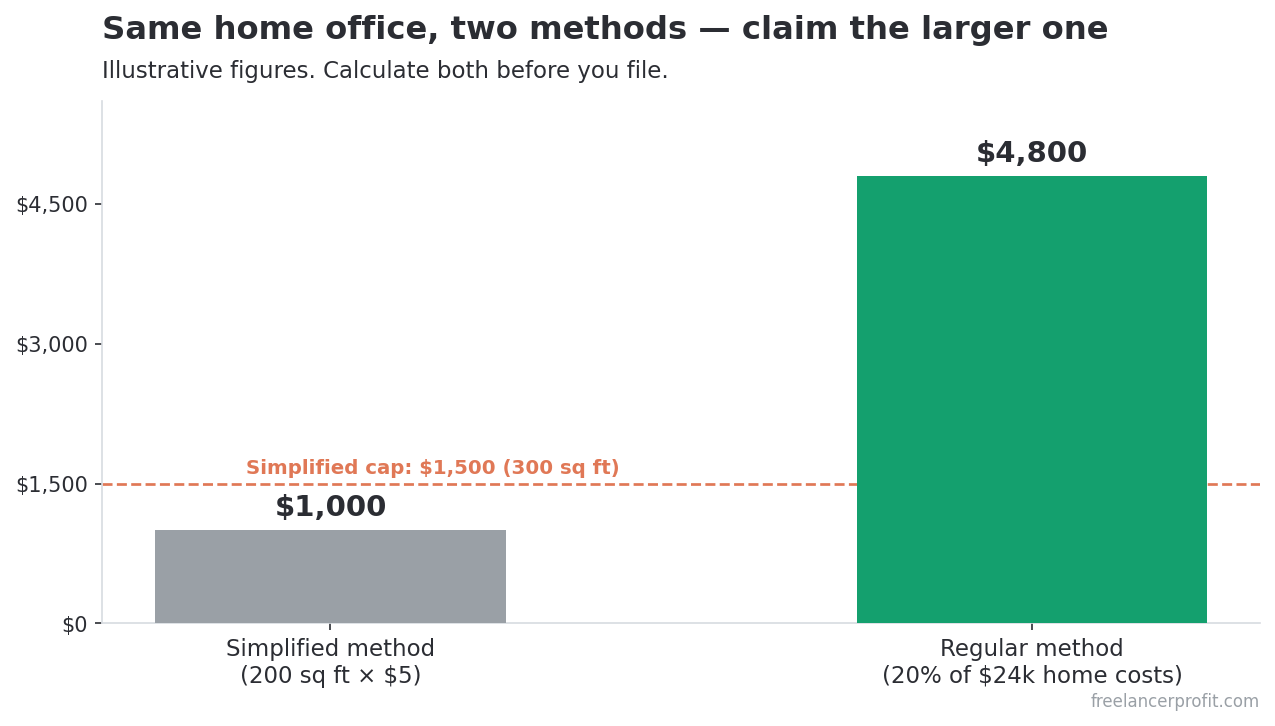
Two methods. The simplified method gives you $5 per square foot up to 300 square feet, capped at $1,500. A 200 square foot studio is a flat $1,000 deduction with no receipts beyond proving the space. The regular method uses Form 8829 and a percentage of your actual home costs, rent, utilities, insurance, which often beats $1,500 if you rent in a high-cost area. Calculate both and take the larger one.
Designers have one advantage here that writers and consultants don’t. Your space genuinely needs equipment a generic office does not. Studio lighting for product shots, a daylight-balanced lamp for color accuracy, acoustic treatment if you also record, an ergonomic chair and desk for ten-hour Illustrator sessions. Items used in the office space are deductible on their own, separate from the square-footage calculation. The full mechanics live in the home office deduction guide.
Can I deduct a design course or conference?
Yes, when the education maintains or improves skills in your existing business. A typography course, a Figma masterclass, a motion design bootcamp: all deductible because they sharpen what you already do for money. Education that qualifies you for a new trade doesn’t count, so a designer taking a law degree is out.
Conferences fold in travel. If you fly to Config or a regional design conference, the registration, the flights, the hotel, and 50% of your meals are deductible, as long as the trip is primarily for business. Add a couple of vacation days and the personal portion stops being deductible, but the business core still is. Keep the agenda or ticket as evidence the trip had a real work purpose.
Books, paid newsletters, and a Skillshare or Domestika subscription belong here too. Small individually. A few hundred dollars a year together.
What design expenses trigger an IRS audit?
Now the other direction. A recurring theme across r/tax and r/freelance is designers who get burned not by missing deductions but by claiming ones that don’t hold. The pattern is always the same: a real expense stretched past what the rules allow. Here’s what to avoid.
- 100% of a personal phone. If you use your phone for life and work, you deduct the business share, not the whole bill. Claiming all of it is a classic flag.
- Clothing, even branded. Regular clothes aren’t deductible even if you only wear them to client meetings. The bar is clothing unsuitable for everyday wear, which a designer almost never has.
- Meals with no business purpose. A coffee while you work alone isn’t a business meal. A meal with a client or collaborator, documented, is 50% deductible.
- The full home when there is no exclusive space. Deducting a chunk of rent for a kitchen-table setup is the home office mistake that shows up most in audits.
- A personal Mac claimed at 100% business use. If it’s also your gaming and Netflix machine, the percentage has to reflect that.
The through-line: the IRS rarely punishes an honest business expense. It punishes the stretch. Claim the real ones fully, split the mixed ones honestly, and skip the ones that were always personal. How we research and verify claims like these is on the methodology page.
The 5-minute framework for any purchase
Run this on anything you buy. It takes about a minute per item once you know it.
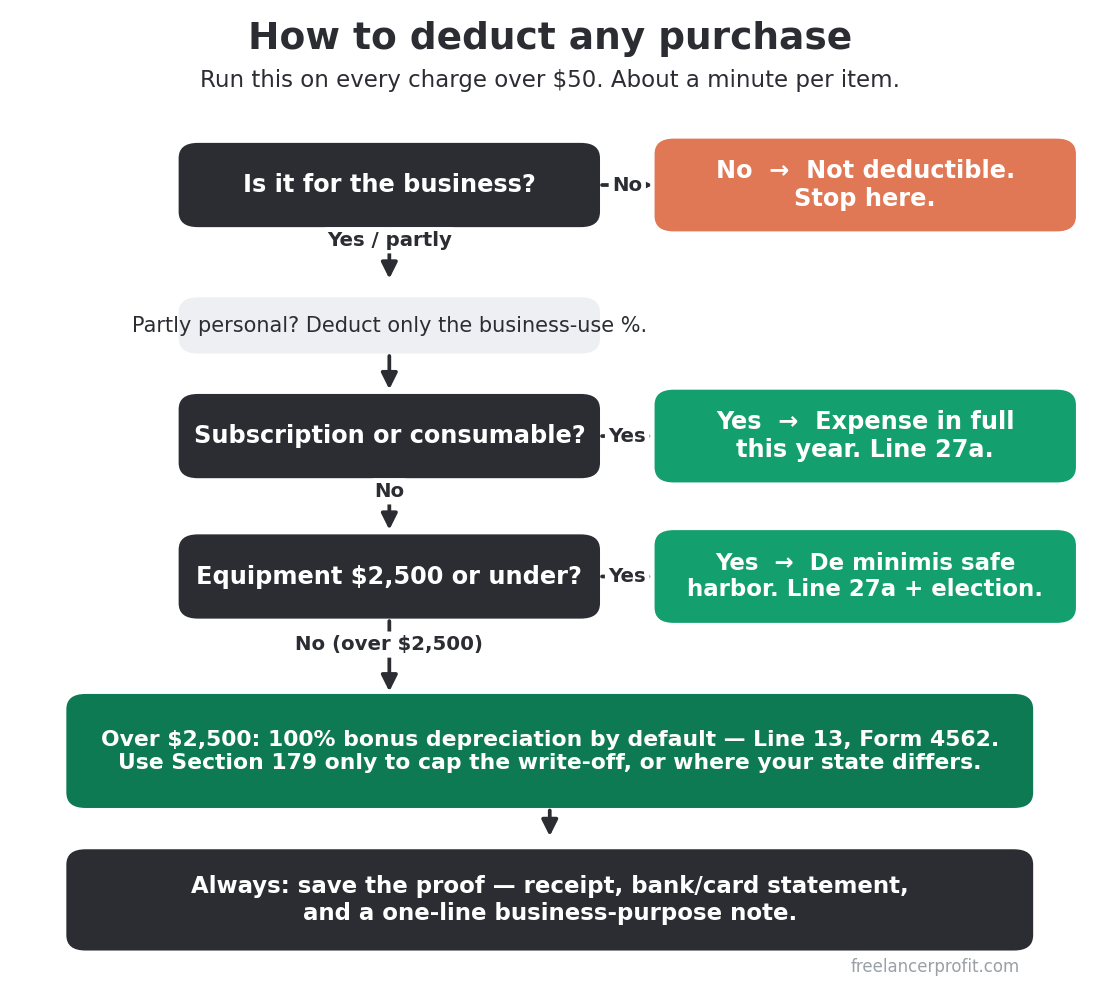
- Is it for the business? If no, stop. If partly, note the percentage now while you remember it.
- Is it a subscription or consumable? If yes, expense it in full this year. Done.
- Is it equipment $2,500 or under? De minimis safe harbor. Expense it this year, make the election.
- Is it equipment over $2,500? 100% bonus depreciation by default. Consider Section 179 only if you want to limit the write-off or your state forces the difference.
- Save the proof. Receipt, statement, and a one-line note of business purpose if it could read as personal.
Five steps. Most designer purchases stop at step two or three. The framework exists so you never again look at a receipt in April and wonder whether it counted.
Two more deductions sit outside this designer list but matter at filing time. If you net a profit, the qualified business income deduction (Section 199A) can take another 20% off, and both self-employed health insurance premiums and business mileage to client meetings or shoots are deductible. These apply to every freelancer, not just designers, so they live in the master guide to tax deductions freelancers miss most.
The designer deduction checklist (free)

I built a one-page checklist of every deduction in this guide, organized by Schedule C line, with the documentation each one needs. Print it, work down it once a quarter, and you’ll stop leaving four-figure deductions on the table. It’s free. No upsell.
Frequently Asked Questions
Can graphic designers write off Adobe Creative Cloud?
Yes. A Creative Cloud subscription used for client work is fully deductible as a business expense on Schedule C, usually line 27a. Creative Cloud Standard runs about $660 a year and Pro about $840, and that full amount comes off your taxable income. Adobe Fonts is bundled inside the subscription, so you don’t deduct it separately. Keep the annual invoice as your record.
Is a new iPad Pro tax deductible for designers?
If you use it for design work, yes. Because most iPad Pro setups cost under $2,500, you can expense the full amount in the year you buy it using the de minimis safe harbor election. If you also use it personally, deduct only the business-use percentage. Keep the receipt and a short note on how you use it. The Apple Pencil and a keyboard bought alongside it follow the same rule.
Can I deduct fonts I buy for client work?
Yes. Font licenses bought for business use are fully deductible in the year you purchase them. That covers a desktop license from MyFonts, a typeface family from Monotype, or a webfont subscription. A single display family can run $200 to $600, so this adds up fast across projects. Keep the license receipt, which also protects you on the usage-rights side, separate from tax.
How much of my internet bill can I deduct as a designer?
You deduct the business-use percentage, not the whole bill, since you almost certainly use home internet personally too. A reasonable, defensible split is common practice, for example 50% if you work from home full time. Estimate honestly based on actual use and keep a note of how you arrived at the figure. The same logic applies to your phone bill.
Do I need receipts for every design expense?
For anything substantial, yes. The IRS expects documentation for deductions, and a bank or card statement plus the vendor receipt is the standard. For small recurring subscriptions, the monthly invoices in your email are enough. For anything that could read as personal, add a one-line note of the business purpose. Keep records for at least three years from when you file, longer for major equipment.
Can I deduct a design course or conference?
Yes, when the education maintains or improves skills in the business you already run. A typography course or a Figma masterclass qualifies. Education that trains you for a new trade does not. For conferences, the registration, travel, lodging, and 50% of meals are deductible when the trip is primarily for business. Keep the agenda or ticket to show the work purpose.
What design expenses trigger an IRS audit?
The common flags are claiming 100% of a personal phone or laptop, deducting regular clothing, writing off solo coffees as business meals, and taking a home office deduction without a space used exclusively for work. None of these are about the expense being fake. They’re about stretching a real expense past the rule. Claim the legitimate ones fully and split mixed-use items honestly.
Do this one thing this week: pull your last twelve months of card statements, and run the five-minute framework on every charge over $50. You’ll find deductions you forgot you made. When you’ve cleared your own list, the full library of freelancer finance guides walks through the filing and money steps that apply beyond design work.
Tax laws change, and this guide reflects 2025 to 2026 rules including the One Big Beautiful Bill Act signed July 4, 2025. Verify current figures at IRS.gov and confirm your specific situation with a CPA. This is informational only and not tax or legal advice.

About the author
Gareth is the founder of Freelancer Profit and a Dubai-based entrepreneur with a business consulting and leadership coaching background. He built the site to give freelancers honest, independent reviews of finance and tax tools, every one researched from official documentation, current pricing, and hundreds of real user reviews across Trustpilot, the BBB, and the app stores. It’s independent research, not professional tax advice, so check your own situation with a CPA.