

Learn how to track business expenses the right way: stop mixing personal and business money, claim every 2026 IRS deduction, and stop quietly overpaying tax you don’t owe.

You can’t track business expenses well when they’re tangled with personal ones. Random Tuesday afternoon. You buy a $42 software subscription on your personal card because your business one is upstairs. By Wednesday you’ve forgotten about it. This is why most freelancers want a clear answer to how to track business expenses without it taking over their week. Do that 60 times in a year and you’ve quietly handed the IRS around $750 in tax you didn’t actually owe.
That’s the whole problem in one paragraph. Each mistake is tiny. They stack up. And by the time you sit down to file in March, you can’t remember what half those charges were for.
I see the same pattern in almost every freelancer who emails me. Smart people. Good at their craft. Quietly losing money because nobody ever told them how to keep track of it.
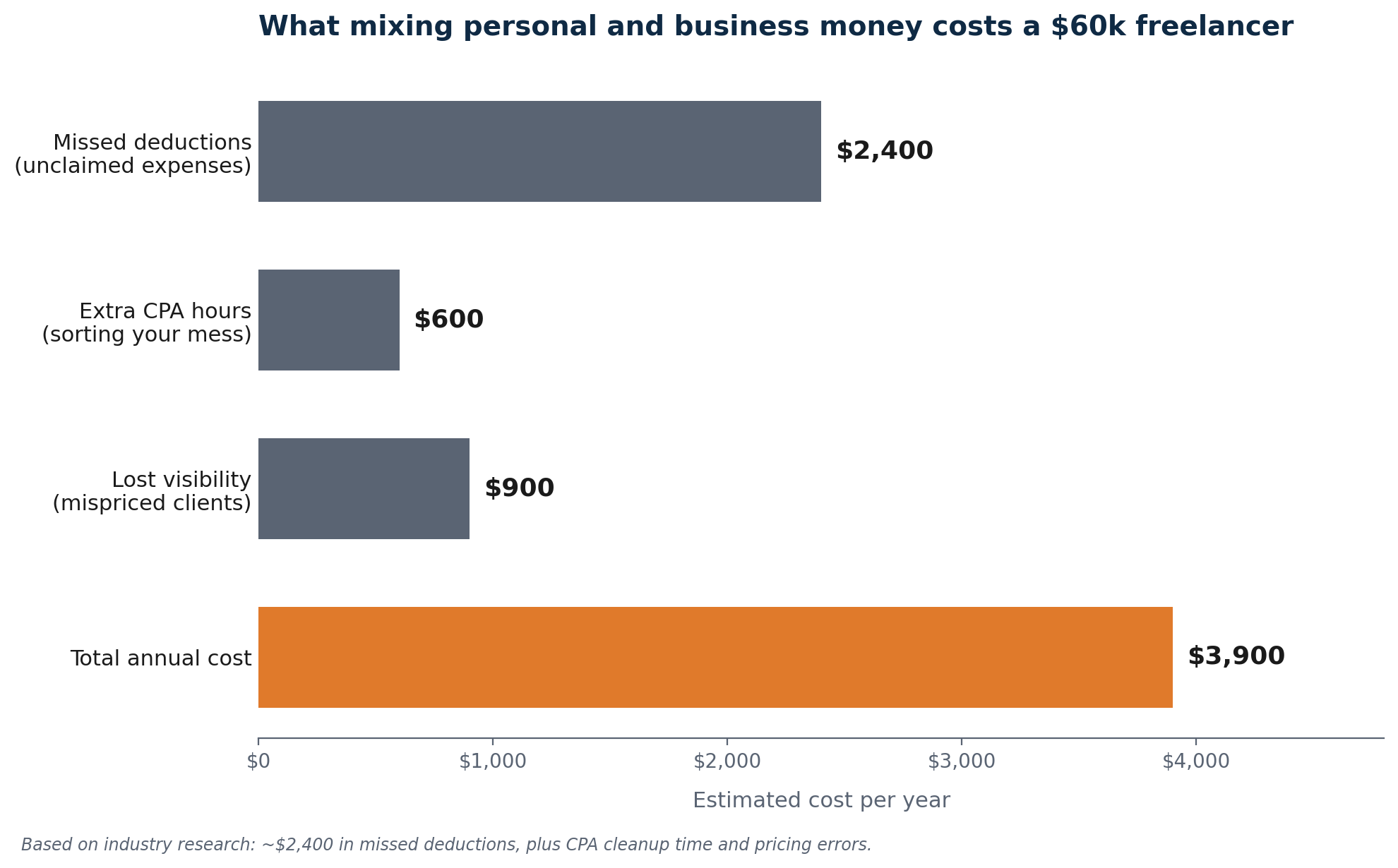
Industry research consistently puts the cost of bad tracking at around $2,400 per freelancer per year in missed deductions. Without proper records, most freelancers capture only 50 to 65 percent of eligible expenses, and IRS audit data suggests the majority of adjustments for self-employed people come down to bad documentation rather than fraud. People aren’t cheating. They just don’t have a system.
Good news: the fix isn’t complicated. You need a system, you need to set it up before the money starts moving (not after), and you need to know which expenses actually count. This guide covers all three. It’s written for the 2026 tax year and reflects the current IRS rules, including changes from the One Big Beautiful Bill Act signed July 4, 2025.
What Mixing Personal and Business Money Actually Costs You
A large share of freelancers miss tax deductions because they don’t track expenses properly. Most aren’t doing it on purpose. They just never set up something that makes capture automatic.
When everything runs through one account, three things go wrong at the same time.
You miss deductions. When you can’t tell which expenses were business and which were personal, you default to claiming the obvious ones and ignore the rest. The accounting software you remember. The client lunch from four months ago, the domain renewal you paid for in March, the online course, the printer ink, the coworking day pass you bought with cash, those disappear. On $10,000 of missed write-offs, the unnecessary tax bill lands somewhere between $3,000 and $4,000 once you add federal income tax and self-employment tax together.
You pay your accountant to clean up your mess. Mixed records mean your CPA spends time sorting transactions instead of doing actual tax planning. That sorting costs you their hourly rate, $150 to $400 per hour, on work a basic system would have eliminated.
You lose visibility. If you can’t see expenses clearly, you can’t see profit. You don’t know which clients are actually profitable once you factor in tools, time, and admin. You end up pricing on feel rather than numbers, which compounds the problem of managing irregular cash flow.
And if you ever get audited and can’t document a deduction, that’s not fraud charges. It just means the deduction gets disallowed. You owe tax on income you already spent.
Is This Deductible? A 30-Second Test
The IRS standard is “ordinary and necessary.” Ordinary means common in your line of work. Necessary means helpful for running your business. That’s vague on purpose. Here’s a faster way to think about it.
Ask three questions in order. Stop the moment you hit a “no.”
- Would I have spent this money if I weren’t running this business? If yes, it’s personal or mostly personal. If no, keep going.
- Can I write one sentence explaining why this was for the business? “Adobe Creative Cloud, used for client design work” passes. “Lunch out” alone doesn’t. If you can’t write the sentence, you can’t defend the deduction.
- Do I have proof the transaction happened? A receipt, a card statement, a bank record, an email confirmation. If you can pull it up in 30 seconds, you have documentation. If you can’t, claim it only if the amount is small enough that the IRS doesn’t require a receipt (under $75).
Three yes answers means deduct it. Two yes answers means deduct only the business portion. One yes or fewer means leave it off.
This test runs on the conservative side, on purpose. The cost of missing a $40 deduction is around $13. The cost of an audit fight over a sketchy claim is much higher. When you’re not sure, write the business reason down at the time of purchase. A note on your phone, a memo line on your card, an email to yourself. Future-you will thank present-you.
The Setup to Track Business Expenses in Three Steps
Done well, this whole setup takes under an hour. The benefit lasts as long as your business does.
Step 1: Open a business bank account
Open a dedicated business checking account and route every client payment to it from this point forward. Every invoice you send, whether through PayPal, Stripe, or a dedicated invoicing tool, directs payment there. Every business expense comes out of it. That single move solves about 70 percent of the tracking problem on its own. It also makes income easy to reconcile at tax time, which matters once you have received a 1099-NEC from a client.
You don’t need a traditional bank for this. Several online banks built specifically for freelancers and small businesses offer free accounts with features traditional banks don’t have. Here’s how the four most commonly recommended options stack up in 2026.
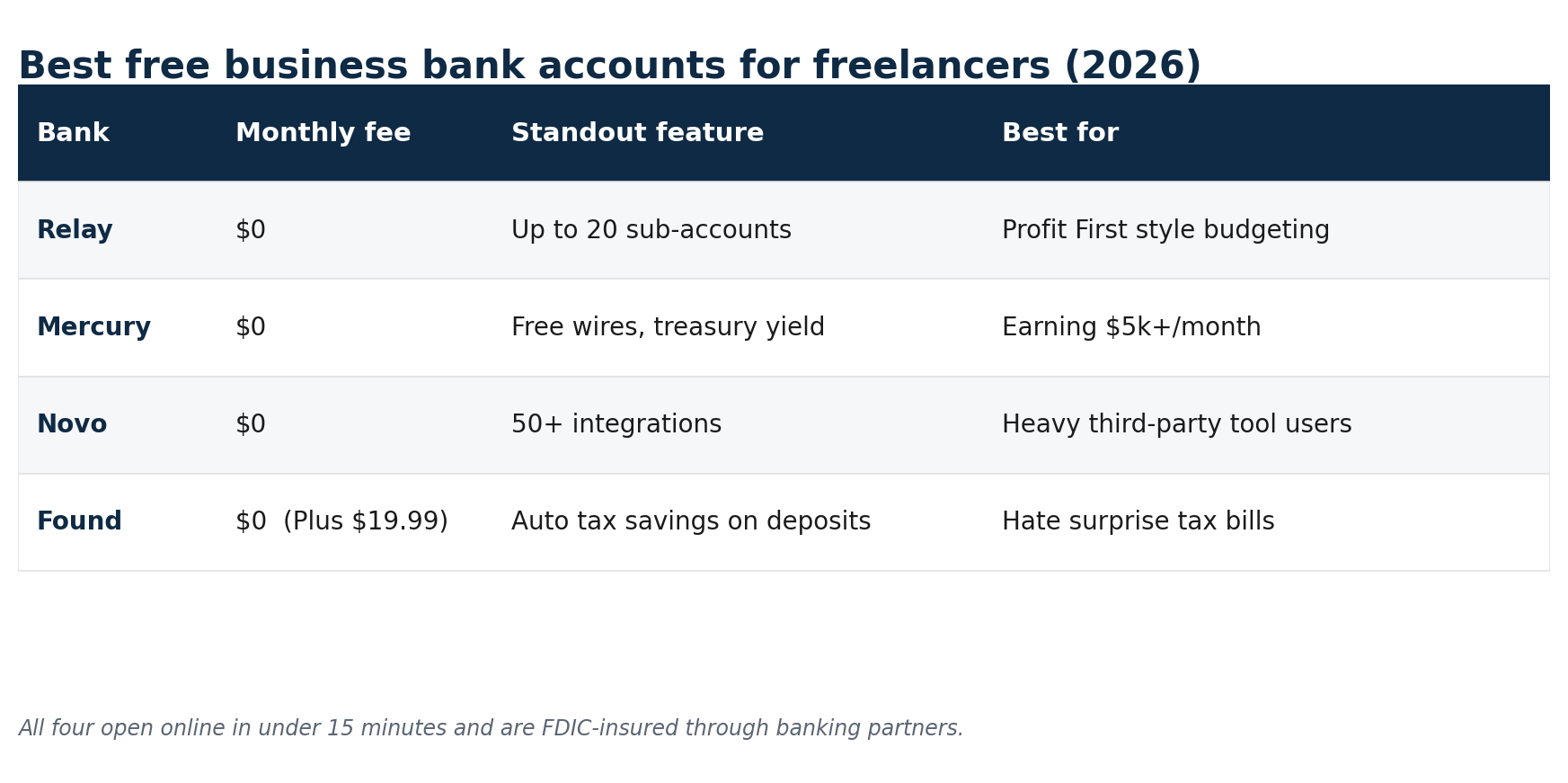
All four are free at the entry level, open in under 15 minutes online, and are FDIC-insured through their banking partners. Skip the traditional big banks that charge $15 to $25 a month and demand minimum balances. You have better options that cost nothing.
Step 2: Get a business credit card or debit card
Once your business account is open, get a dedicated card for business purchases. The rule here is simple: every business purchase goes on this card. No exceptions, no “I’ll just use my personal one this once.” When you stick to it, your card statement turns into a near-complete record of your business expenses, automatically timestamped and sorted by vendor. Reconciliation takes minutes instead of hours.
Most business credit cards offer 1.5 to 2 percent cash back. For a freelancer spending $12,000 a year on business expenses, that’s $180 to $240 back annually on spending you were going to do anyway.
Step 3: Connect everything to accounting software
Connect your business bank account and business card to accounting software. Once connected, transactions import automatically and the software categorizes them based on vendor and transaction type. Your job becomes reviewing and correcting the categories, not entering data from scratch.
Freelancers who switch from spreadsheets to accounting software consistently report categorization time dropping from two hours per month to about 15 minutes. Tax-prep time falls 60 to 80 percent. Set it up once. From there, every transaction is waiting in your software when you log in, pre-categorized and ready for a quick review.
For a closer look at the tools, my guide to the best accounting software for freelancers compares pricing, features, and the freelancer-specific complaints in detail.
What to Track: How to Track Business Expenses by Category
This section runs through every category of deductible expense for freelancers, with documentation requirements and 2026 IRS rates where they apply. For a deeper breakdown of specific write-offs, see my guide to tax deductions for freelancers.
Software and subscriptions
Anything you pay for to run your business is deductible. Accounting software, design tools, project management apps, communication platforms, cloud storage, email marketing, hosting, domains, stock images. Run a list of every recurring charge on your business card statement. Most freelancers find $50 to $200 per month in subscriptions they forgot about. Some you can cancel. All of them you can deduct.
Documentation: the payment receipt or bank statement entry. Most tools email you a receipt monthly. Auto-forward those to a dedicated tax folder so you never have to think about it.
Home office
If you work from home, you can deduct a portion of your housing costs. The space has to be used regularly and exclusively for business. There are two methods.
- Simplified method: $5 per square foot up to 300 square feet. Maximum deduction $1,500. No receipts required, just the measurement.
- Standard method: calculate the percentage of your home’s square footage used for business, then apply that percentage to your actual housing costs (rent or mortgage interest, utilities, insurance, repairs). File Form 8829.
Run both calculations. For most apartment-based freelancers, the simplified method wins on ease and produces a similar number. For homeowners with high mortgage interest and utility bills, the standard method usually pays more. The difference can be over $1,000 in some cases.
Documentation: for the standard method, keep records of rent, utility bills, and home repair receipts. For the simplified method, a photo of your workspace and its measurement is enough.
The myth that claiming a home office triggers an audit is outdated. The IRS made this deduction routine years ago. If you qualify, claim it.
Equipment
Computers, monitors, keyboards, external drives, webcams, microphones, studio lighting, cameras, printers. Anything physical you use for work. Under the One Big Beautiful Bill Act of 2025, 100 percent bonus depreciation is available for qualifying assets placed in service after January 19, 2025. That means you can deduct the full cost in the year of purchase rather than spread it over several years.
For equipment used partly for personal use, deduct only the business-use portion. A laptop you use 80 percent for client work and 20 percent for personal browsing gets an 80 percent deduction.
Section 179 is the alternative method for expensing equipment in the year of purchase. It overlaps with bonus depreciation but uses a separate election with annual dollar caps. Worth knowing about because bonus depreciation rules have shifted repeatedly over the years, and Section 179 stays as a fallback when those rules change.
Documentation: the purchase receipt. For purchases over $2,500, write down the business purpose at the time of purchase.
Vehicle and mileage
The 2026 IRS standard mileage rate is 72.5 cents per mile for business use from January through June, and 76 cents per mile from July 1, 2026, after a mid-year IRS increase. Both are up from the 2025 rate of 70 cents. This applies to driving to client meetings, supply runs, coworking spaces, and any other business trip.
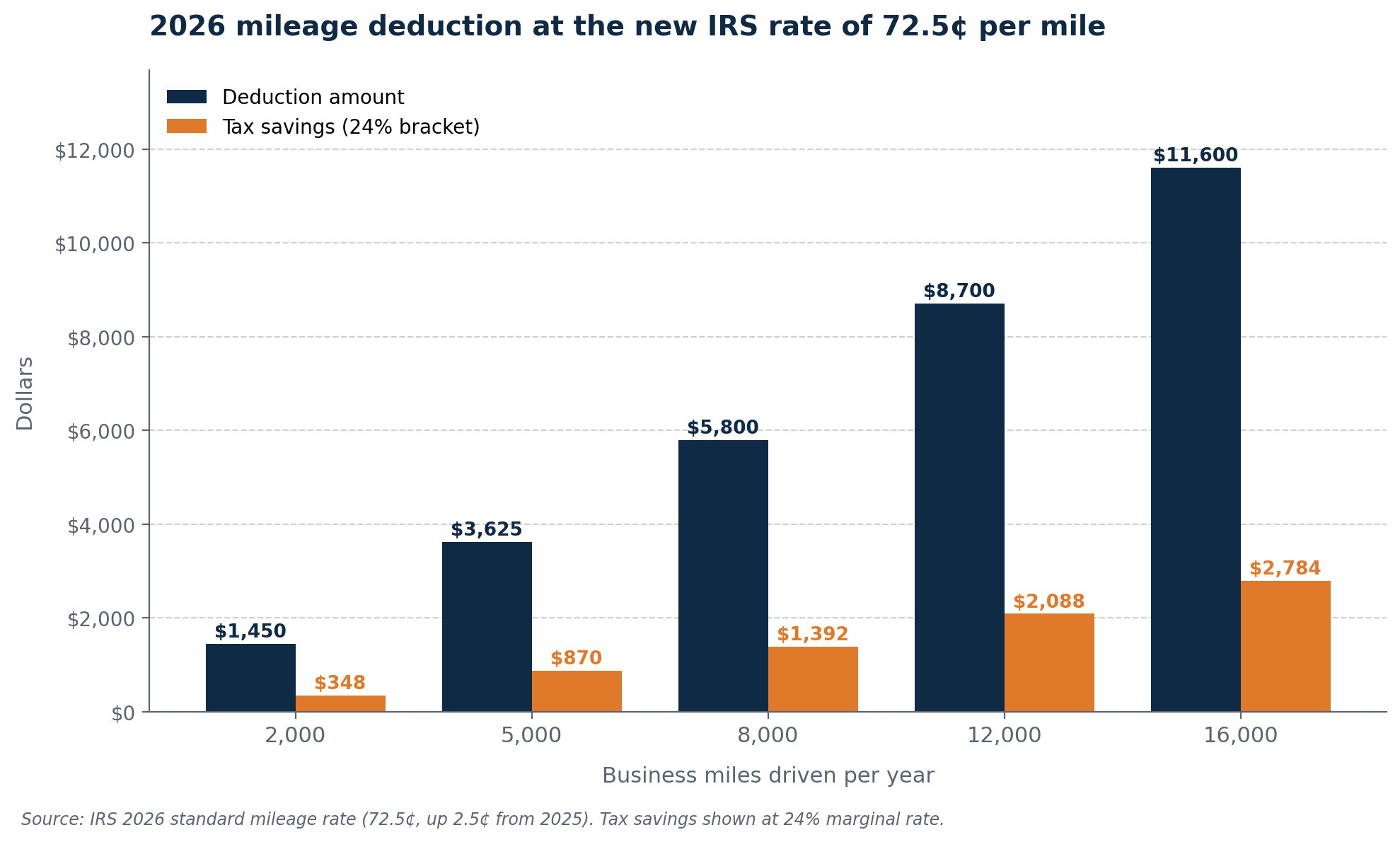
At 72.5 cents per mile (the January through June 2026 rate), 5,000 business miles produces a $3,625 deduction, which is $870 in tax savings at a 24 percent bracket. At 8,000 miles, it’s $5,800 and roughly $1,400 in savings.
The IRS wants a contemporaneous log: date, destination, miles driven, and business purpose for each trip. Contemporaneous means recorded as you drive, not reconstructed from memory at year-end. Apps like MileIQ, TripLog, or the built-in mileage feature in QuickBooks Self-Employed do this automatically. Turn the app on once, drive, then swipe each trip into “business” or “personal” at the end of the day.
If your vehicle is used heavily for business and is expensive to operate (large SUV, truck, electric vehicle with high lease costs), the actual expense method may pay more. You track gas, insurance, maintenance, and depreciation, then deduct the business-use percentage. The trade-off is more recordkeeping. Most freelancers stick with the standard rate for simplicity.
Health insurance premiums
If you pay for your own health insurance and you’re not eligible for coverage through a spouse’s employer plan, 100 percent of your premiums are deductible above the line. That reduces your adjusted gross income whether you itemize or not. A freelancer paying $700 a month deducts $8,400 a year, which works out to about $2,016 in federal income tax saved at a 24 percent bracket.
Documentation: annual premium statement from your insurer or monthly payment receipts.
Internet and phone
Phone and internet are deductible for the business-use portion. If 60 percent of your internet usage is client work, claim 60 percent of the bill. Be honest about the percentage. Claiming 100 percent of a phone you obviously also use personally is an audit flag.
Defensible ranges for most freelancers: 50 to 70 percent for phone if you actively use it for client calls and email, 60 to 80 percent for internet if you work from home most days. Document how you arrived at the number. “I’m online 8 hours a day for work and roughly 4 hours for personal use, so I claim 67 percent” is a defensible note.
Business meals
50 percent of qualifying business meals are deductible. The meal needs a clear business purpose: meeting a client, discussing a project, networking with a partner. Keep the receipt and write on it who you met, the date, and what you talked about. Entertainment (concerts, sports tickets, golf) is not deductible, even if you talked business the whole time.
Professional services
Your accountant, bookkeeper, contract lawyer, and any other professional service related to your business is fully deductible. The cost of preparing your taxes goes here too. The $400 to $700 you pay a CPA for last year’s return is a business expense on this year’s Schedule C.
Marketing and advertising
Website hosting, domain registration, social media advertising, Google Ads, business cards, branded merchandise, professional headshots used in marketing. All deductible at full cost.
Education and professional development
Courses, workshops, certifications, books, industry subscriptions, and conferences related to your current work qualify. The education has to improve skills you use now. A copywriter taking an advanced copywriting course: deductible. The same copywriter taking a real estate licensing course: not deductible.
Bank fees and payment processing
Account maintenance fees, wire fees, Stripe and PayPal processing fees, credit card processor charges. All deductible. These add up faster than most freelancers realize. A freelancer collecting $80,000 through Stripe pays roughly $2,400 in processing fees. That’s real deductible money that most people forget to claim.
Professional insurance
Business liability insurance, professional liability (errors and omissions), and any other policies that protect your business are fully deductible on Schedule C, Line 15. If your premium covers multiple years, deduct only the portion that applies to the current tax year.
How Each Expense Maps to Schedule C
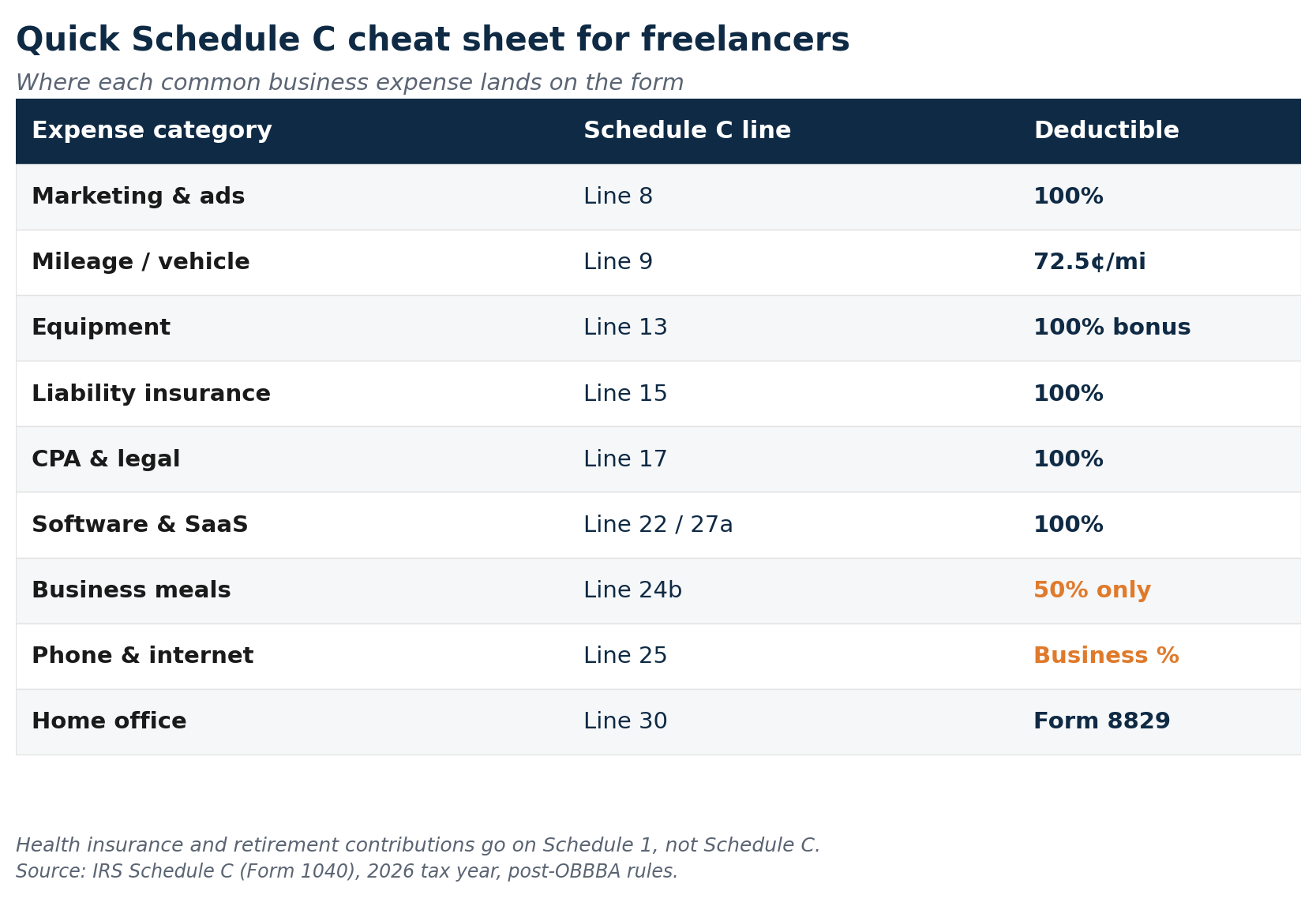
This is where most freelancers get tripped up. Your accounting software might have one category called “Software” but Schedule C wants it on Line 22 (Supplies) or Line 27a (Other expenses) depending on context. Here’s the cheat sheet.
| Expense | Schedule C line | Notes |
|---|---|---|
| Marketing, ads, business cards | Line 8 (Advertising) | Includes Google/Meta Ads, sponsored posts, branded swag |
| Mileage / vehicle costs | Line 9 (Car and truck) | Standard rate or actual expenses, choose one method |
| Subcontractors paid $2,000+ | Line 11 (Contract labor) | Threshold rose from $600 to $2,000 under OBBBA for 2026 payments; issue 1099-NEC by January 31 |
| Equipment depreciation | Line 13 (Depreciation) | 100% bonus depreciation available for assets placed in service after Jan 19, 2025 |
| Liability/E&O insurance | Line 15 (Insurance, not health) | Health insurance goes on Schedule 1, not Schedule C |
| Business loan interest | Line 16 (Interest) | Only the business-use portion if loan is mixed |
| CPA, bookkeeper, lawyer fees | Line 17 (Legal/professional) | Tax prep fees go here too |
| Office supplies (paper, pens, ink) | Line 18 (Office expense) | Small consumable items used for business |
| Software subscriptions, hosting | Line 22 (Supplies) or 27a | Most software lands on Line 22; SaaS subscriptions often on 27a |
| State business tax, licenses | Line 23 (Taxes/licenses) | LLC fees, professional licenses, state fees |
| Travel (flights, hotels) | Line 24a (Travel) | 100% deductible if primary purpose is business |
| Business meals | Line 24b (Meals) | 50% deductible only |
| Phone, internet (business %) | Line 25 (Utilities) | Document the business-use percentage |
| Bank fees, processing fees | Line 27a (Other expenses) | List as separate line items in Part V |
| Education, courses, books | Line 27a (Other expenses) | Must relate to current work |
| Home office | Line 30 | Use Form 8829 for the standard method |
| Health insurance | Schedule 1, Line 17 | Above-the-line, not on Schedule C |
| SEP-IRA / Solo 401(k) | Schedule 1, Line 16 | Retirement contributions, also above-the-line |
Save this table somewhere you can find it. Most freelancers waste 30 to 60 minutes at tax time figuring out which line takes which expense. With this mapping in front of you, that part of the job disappears.
Behind on Tracking? Here’s the Catch-Up Plan
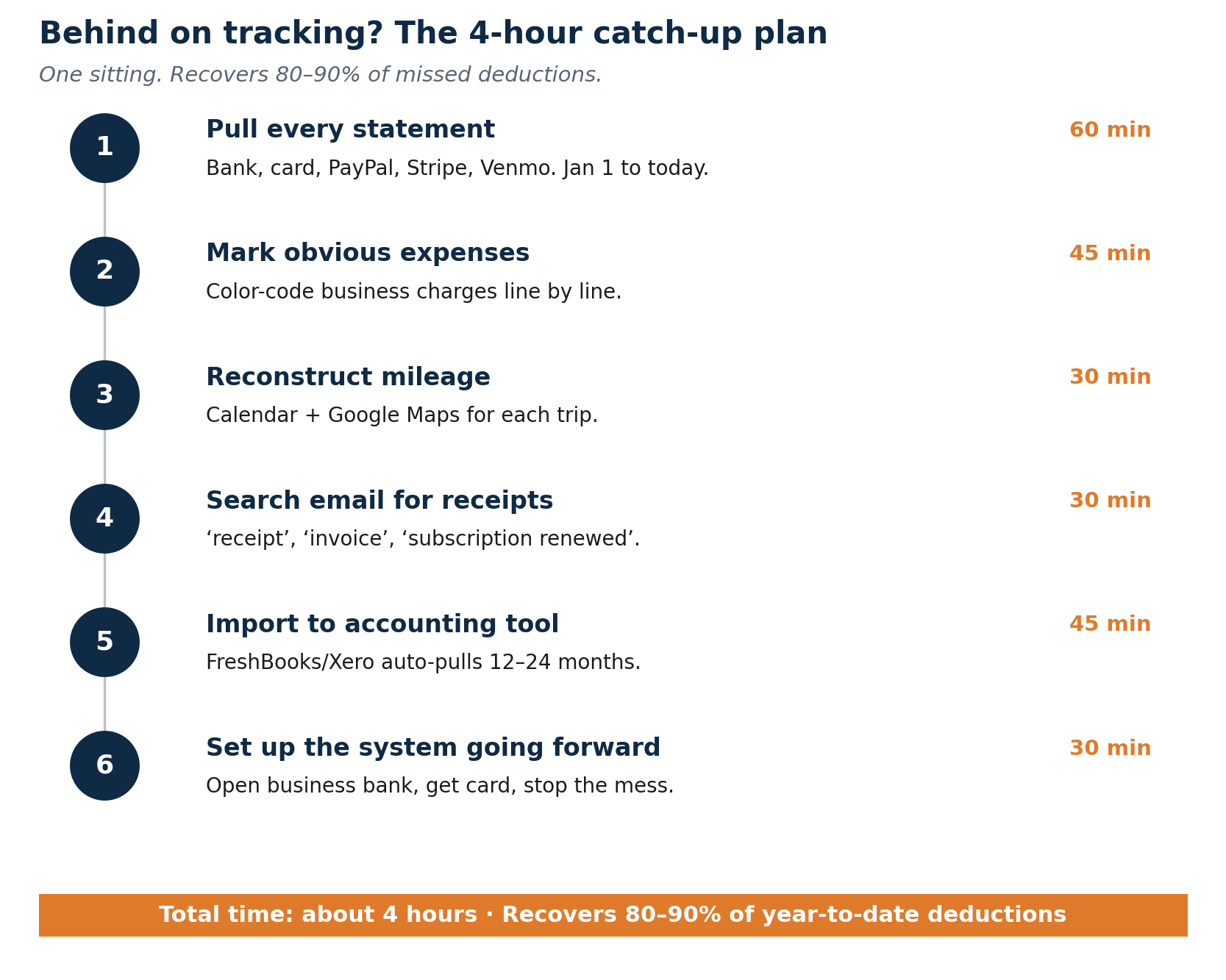
This is the section nobody else writes. If you’re reading this in August and haven’t tracked anything since January, the answer isn’t “give up and overpay.” It’s a 4-hour project, done in one sitting, that recovers most of what you’d otherwise lose.
- Pull every statement (60 min). Download CSV exports of every business and personal account from January 1 to today. Bank, credit card, PayPal, Stripe, Venmo. Drop them all into one folder.
- Mark the obvious business expenses (45 min). Go line by line. Flag every transaction that’s clearly for the business: software subscriptions, client lunches, supplies, conference fees, recurring vendor charges. Use color coding or a spreadsheet column.
- Reconstruct mileage from your calendar (30 min). Open your Google Calendar or scheduling app. Every meeting that involved driving counts. Estimate distances using Google Maps. The IRS accepts a reasonable reconstruction for catch-up purposes if you switch to contemporaneous tracking from now on.
- Search your email for receipts (30 min). Search “receipt,” “invoice,” “subscription renewed,” “your order,” and your business card last 4 digits. Forward everything relevant to a folder labeled by year.
- Open accounting software and import (45 min). Sign up for FreshBooks, Xero, or QuickBooks. Connect your business accounts. The software will pull historical transactions automatically (most go back 12 to 24 months). Spend 30 minutes correcting categories.
- Set up the system properly going forward (30 min). Open a business bank account if you don’t have one. Move all client invoices to bill to it. Get a business card. From this Tuesday forward, every business purchase goes on the new card. The mess stops here.
Most people who do this in September recover 80 to 90 percent of the deductions they would have captured with year-round tracking. The remaining 10 to 20 percent is real money lost. It’s also the lesson that locks the new habit in. Run this catch-up once and you won’t repeat the year.
If you missed deductions on a return you’ve already filed, you can amend it. Form 1040-X covers the last three years of returns. For most freelancers, it’s worth amending if the missed deduction is over $1,500. Below that, the time and the CPA cost to amend usually exceeds the refund.
Once your expenses are tracked properly, the math for quarterly estimated taxes also gets dramatically easier. You’ll have a clean income-minus-expenses number every quarter instead of guessing.
The Five Habits That Keep Your Records Clean
The goal here is to make tracking so routine that tax season becomes a non-event. Five habits, done consistently, get you there.
- Record same day. When you buy something for the business, open your accounting app and confirm the category. It takes 30 seconds. Waiting until month-end means two hours of forensic work and missed transactions.
- Snap every receipt right away. Most accounting tools let you photograph a receipt and attach it to the transaction directly. Once the photo is clear, the paper receipt can go in the bin.
- Monthly 15-minute review. Once a month, open your software and confirm imported transactions are categorized correctly. Fix anything wrong. Check the mileage log is current. Fifteen minutes monthly beats fifteen hours in March.
- Track mileage as you drive. Most accounting software doesn’t auto-log driving. Use MileIQ, TripLog, or QuickBooks Self-Employed’s mileage feature. Turn it on at the start of every business trip.
- Quarterly subscription audit. Set a calendar reminder every three months to review every recurring charge. Cancel what you don’t use. Document anything new. This keeps your expense list accurate and catches money leaking on tools that aren’t earning their cost.
The Tools That Automate Most of This
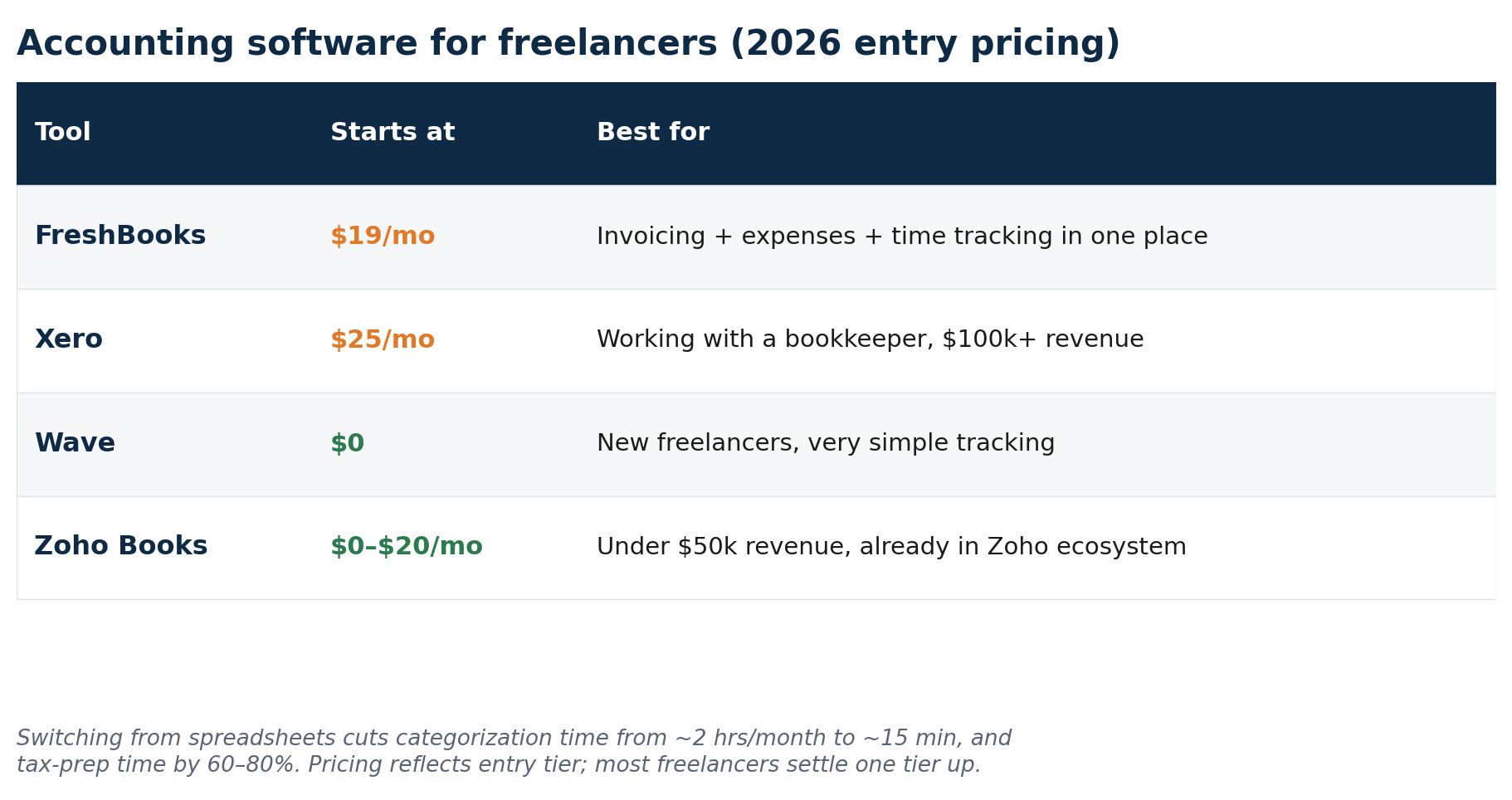
Tracking expenses in a spreadsheet works, technically. It’s also slow and full of room for error. The right accounting tool connects to your bank, imports daily, categorizes automatically, and lets you correct in a fraction of the time.
FreshBooks
Best for: freelancers who want invoicing, expense tracking, and basic accounting in one tool.
FreshBooks imports bank transactions automatically, categorizes them by vendor, and lets you attach receipt photos. The expense report shows every deductible category with totals at a glance, ready for your accountant or your own Schedule C. Time tracking converts to invoice line items, catching billable hours that would otherwise go unrecorded.
Pricing: starts around $19 a month. Most freelancers settle on the Plus plan around $33 a month.
Xero
Best for: freelancers working with a bookkeeper or accountant, or those above $100,000 in revenue who need professional-grade reporting.
Xero’s bank reconciliation matches imported transactions to your records automatically. Categorization is detailed and customizable. Unlimited users on every plan means your accountant accesses your records at no extra cost. Multi-currency support matters if you invoice international clients in their local currency.
Pricing: starts at $25 a month, though most freelancers need the $55 Growing plan for unlimited transactions.
Wave
Best for: new freelancers keeping costs at zero, or those with very simple tracking needs.
Wave’s core expense tracking is free. Connect your bank account on the Pro plan ($16 to $19 a month) and transactions import automatically. Bank feeds vary by provider, so it’s worth knowing how Relay and Mercury sync with your accounting software before you pick a business bank. The free plan still requires manual input. Receipt scanning works through the mobile app. Wave does start to creak as your business grows: fewer integrations, no built-in time tracking, and a steady stream of user complaints about payment processing delays.
Zoho Books
Best for: freelancers who want full-featured tracking at a lower price, or anyone already using other Zoho products.
Zoho Books is free for businesses earning under $50,000 a year. Above that, paid plans start around $20 a month for the Standard tier. Tracking is detailed, receipt scanning works well, and the Zoho CRM connection is tight if you use that for client management. Outside Zoho’s own product family, the integrations are more limited than Xero or FreshBooks.
What Records to Keep When You Track Business Expenses
Keep most business records for three years from the filing date of the return on which the deduction was claimed. Keep them for seven years if you ever claimed a loss or had a substantial omission. The simpler rule: keep everything for seven years and stop thinking about it.
Cloud backup is non-negotiable. Physical receipts fade. Paper files get lost. A photo of a receipt stored in Google Drive or Dropbox, named with the vendor and date, is retrievable years later. Most accounting tools store receipt images directly on the transaction, which keeps everything in one searchable place.
Mileage logs deserve special attention. The IRS scrutinizes vehicle deductions closely. A complete log shows date, starting point, destination, total miles, and business purpose for every trip. If you’re audited and can’t produce a contemporaneous log, those deductions get disallowed.
What Happens If You’re Audited
The word “audit” generates more anxiety than the reality earns. Most audits for self-employed people are correspondence audits. The IRS sends a letter questioning a specific deduction and asks for documentation. You send the documentation. Issue closes.
The problem is rarely fraudulent claims. It’s the absence of records for legitimate ones. Good records solve this completely. If you claim a home office and the IRS asks, you have your square footage, your rent receipts, and your calculation. If you claim mileage, you have a timestamped log with destinations and purposes. If you claim a client meal, you have the receipt with a note on the back.
This is why the daily habit matters so much more than the annual scramble. You can’t reconstruct twelve months of documentation in March. You can spend 30 seconds per transaction all year to make sure it’s there when you need it. For more on the broader tax planning side, my guide to avoiding tax liability shock covers what to set aside and when.
Get Your Free Expense Tracking Checklist

I’ve put together an Expense Tracking Checklist covering 50+ deductible expenses organized by Schedule C category. Use it once when you set up your system, then again every January before you file. Most freelancers find deductions on it they weren’t claiming before.
Track Business Expenses: Frequently Asked Questions
Do I legally need a separate business bank account?
As a sole proprietor, no. There’s no legal requirement. As an LLC or S-corp, yes. But “not legally required” misses the point. Mixing finances makes tracking laborious, confuses your accountant, and increases the chance of missing deductions. It takes 15 minutes to open a free account with Relay, Novo, or Found. The time saved at tax season alone justifies the move.
Can I deduct my home office if I also work from coffee shops?
Yes. The home office deduction covers your dedicated workspace at home. Working occasionally from other locations doesn’t disqualify you, as long as the home office is your principal place of business and you use it regularly and exclusively for work. Coworking memberships and client-meeting coffees are separate deductible expenses.
What if I accidentally paid a business expense from my personal account?
Reimburse yourself. Transfer the amount from your business account to your personal account and label the transfer “reimbursement for [expense].” Record the original purchase in your accounting software with the right category and attach the receipt. Your business records stay clean and the deduction gets captured.
How do I handle expenses that are partly personal?
Deduct only the business portion. For a laptop used 75 percent for work, deduct 75 percent of the cost. For a phone used 60 percent for client communication, deduct 60 percent of the bill. Note how you arrived at the percentage in your records. Claiming 100 percent of an obviously mixed-use item is an audit flag.
Do I need to keep paper receipts for small purchases?
The IRS doesn’t require a paper receipt for expenses under $75, though you still need some documentation: a bank or card statement entry showing amount, date, and vendor. For anything over $75, keep the actual receipt. For cash purchases, write a dated note describing what you bought and why. A photo of the receipt is fine. The paper original isn’t required.
Should I use a spreadsheet or accounting software?
Accounting software, almost always. A spreadsheet requires manual entry for every transaction, which most freelancers do inconsistently at best. Software imports automatically, categorizes by vendor, and generates the reports you need at tax time. The $19 to $33 a month for FreshBooks pays itself back in time saved within the first month.
What’s the highest-value deduction most freelancers miss?
The Qualified Business Income deduction (Section 199A). The One Big Beautiful Bill Act of July 2025 made this deduction permanent and added a new $400 minimum starting in 2026. For 2026 tax year, single filers with taxable income below $201,775 (or $403,500 for joint filers) can deduct 20 percent of net self-employment income from federal taxable income. No separate expense required. At $80,000 of net income, the QBI deduction reduces taxable income by $16,000, which saves roughly $3,520 in federal tax at a 22 percent bracket. A lot of freelancers don’t know it exists because it sits on a different part of the return than Schedule C.
I haven’t tracked anything yet this year. Is it too late?
Not even close. The catch-up plan earlier in this guide takes about four hours and recovers 80 to 90 percent of what you’d have captured with year-round tracking. Pull every statement, search your email for receipts, reconstruct mileage from your calendar, and import everything into accounting software. Then set up the system properly going forward so you don’t repeat the year.
I missed a big deduction on a return I already filed. Can I get the money back?
Yes, with Form 1040-X. You can amend any return filed within the last three years. For most freelancers, it’s worth amending if the missed deduction is over $1,500 (the refund typically runs $400+ at that level). Below that threshold, the time and any CPA fee to file the amendment usually outweighs what you’d recover.
Start Here
Open a separate business bank account today. Relay, Mercury, Novo, and Found all open in under 15 minutes and charge nothing monthly. Once it’s open, route your next client payment to it. Then connect it to whichever accounting tool fits your situation.
That’s the start. Everything else builds from that one decision.
Tax rules change every year. The information in this guide reflects 2026 IRS rules and the One Big Beautiful Bill Act of 2025. Verify current deduction rules at IRS.gov or with a qualified tax professional before filing. This guide is for informational purposes and does not constitute tax or legal advice.
About the author
Gareth is an entrepreneur based in Dubai and the founder of Freelancer Profit. He’s not a CPA or a bookkeeper. He built this site because he couldn’t find honest, thorough reviews of AI finance tools written for freelancers. Every guide is researched from real user reviews, official documentation, and expert sources.